
TachiyomiSY: Complete Guide, Features & How to Use in 2026
TachiyomiSY (often shortened to SY) is a free, open-source manga reader for Android. It originally branched from TachiyomiAZ and later aligned its development with Mihon, while continuing to add its own features on top. If you have used Tachiyomi or Mihon, the layout will feel familiar. The extra options are what set it apart.
People look at this app for a few reasons: they are moving away from the original Tachiyomi, they want more control than Mihon gives them, or they follow a lot of series and want faster ways to manage them. This guide explains where the app came from, what it adds, how to use it day to day, how it compares with Mihon and the original Tachiyomi, and what to do when something breaks. It is an informational guide, not a download page. For the wider family of apps, see our Tachiyomi forks overview.
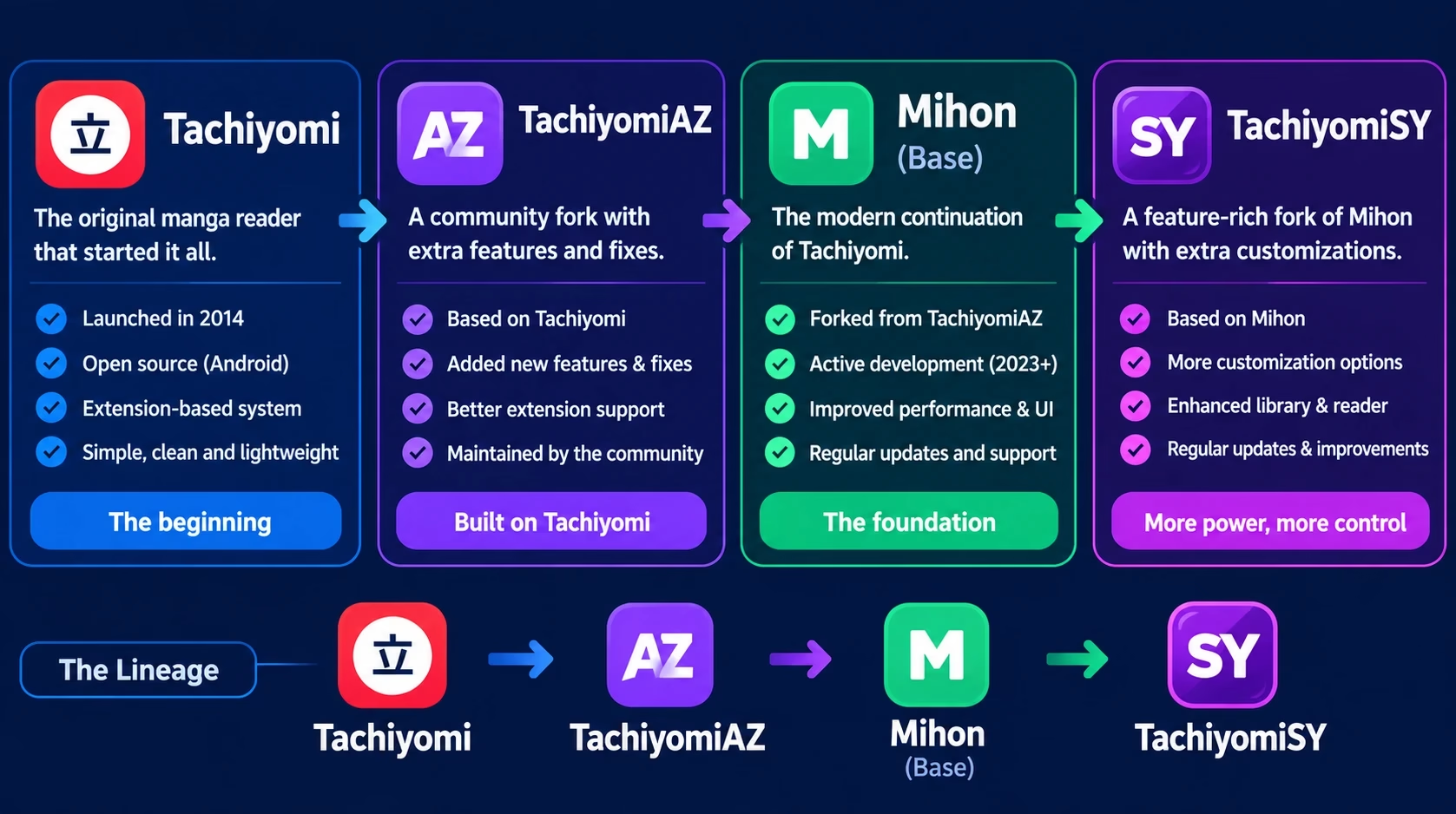
Quick answer: SY is an Android manga reader with extra features. It branched from TachiyomiAZ and now follows Mihon. It uses the same style of extensions, is still receiving releases according to its public GitHub page, and does not run natively on PC.
What Is TachiyomiSY?
It keeps the library, source browsing and reader workflow of the Tachiyomi family and adds tools of its own. Its history is easy to get wrong, so here is the short version:
- Tachiyomi was the original open-source Android manga reader, and many forks grew out of it.
- TachiyomiAZ was one of those forks. SY originally branched from it.
- Mihon is a community-maintained continuation of the Tachiyomi codebase.
- SY later aligned its development with Mihon, taking Mihon’s fixes and changes while keeping its own name, features and customizations.
Important: TachiyomiSY should not simply be described as a direct fork of Mihon. It originally came from TachiyomiAZ and later aligned with Mihon as its upstream/base.
The project’s own release notes say the same thing. When the original Tachiyomi project wound down, the maintainer announced that SY would continue, grabbing fixes and changes from Mihon while keeping its name and everything tied to it. You can read the code and history in the project’s GitHub repository.
How It Differs From the Original Tachiyomi
- Extra features. It adds tools that the plain Tachiyomi and Mihon experience does not ship with.
- A different base. It follows Mihon’s code rather than the discontinued original.
- A more enthusiast audience. It tends to suit readers who like adjusting how the app behaves.
Is TachiyomiSY Still Working in 2026?
As far as public information shows, yes. The project’s GitHub releases page lists regular updates, and at the time of writing the latest stable release listed was 1.13.2. That release dropped support for Android 6 and 7, so very old phones need an older build.
A few things are worth understanding about updates:
- SY follows Mihon. Release notes often say which Mihon version a build is based on. Fixes in Mihon usually reach SY a little later, because they have to be merged first.
- There are stable and preview builds. Preview builds get changes earlier and can be less polished. When a bug affects some devices, a fix often appears in a preview build before the stable one.
- Details change. Version numbers, supported Android versions and project links move over time. Check the project’s GitHub page for the exact current state rather than relying on any article, this one included.
This guide avoids calling any version “100% working.” How well the app runs depends on your device, your Android version and the extensions you use.
TachiyomiSY Features
This section covers the features that matter in daily use. For the exact list in your version, the project README and changelog are the authority.
Latest Tab and Source Shortcuts
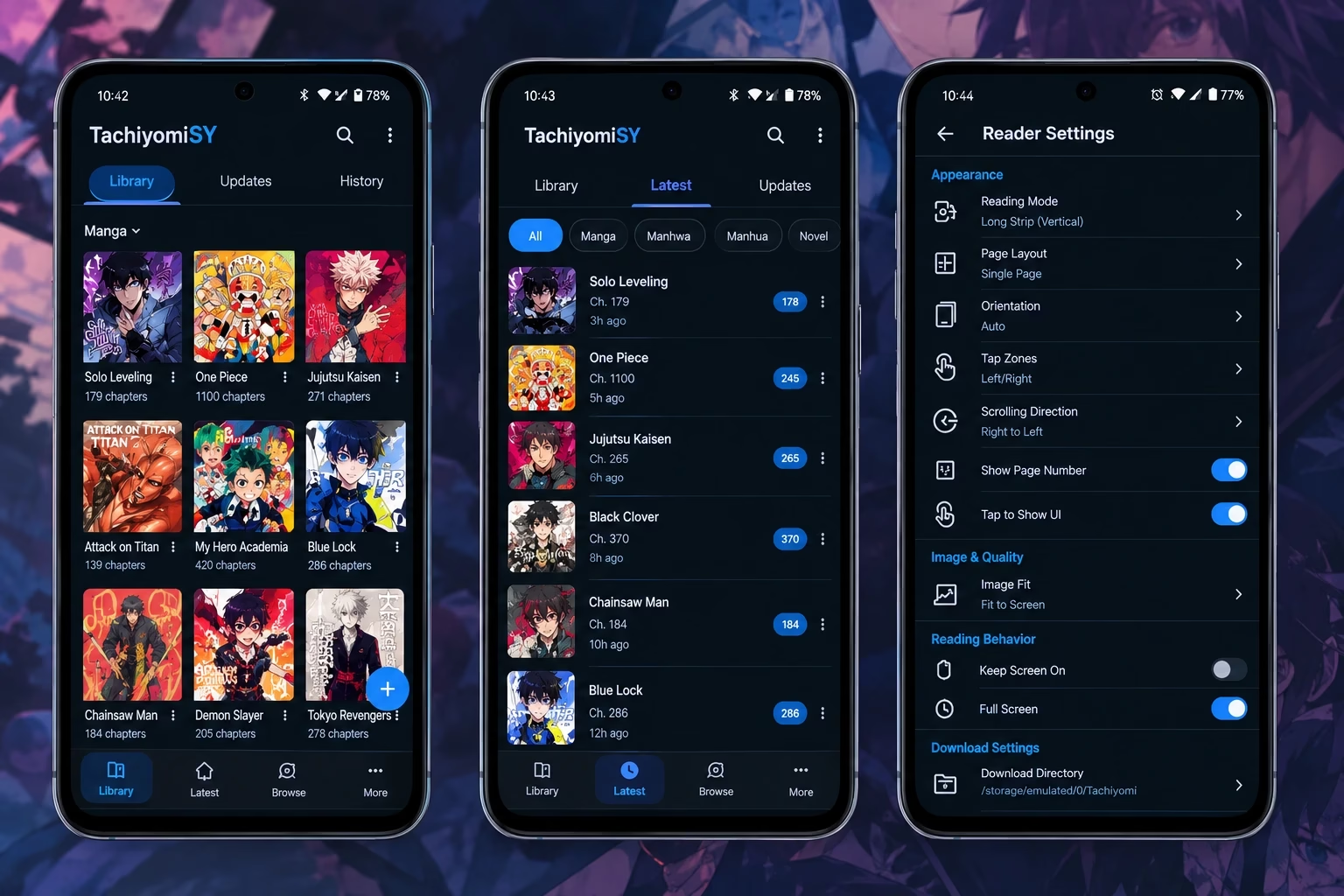
The most talked-about addition is the Latest tab. SY lets you pin a small number of sources, up to five according to the project README, so one tab shows the newest releases from the sources you actually follow. Without it, you open each source one by one.
Reading and Library Features
SY adds organization tools that help once a library grows:
- Extra ways to organize and filter a large library
- Tools for handling the same series across several sources
- Metadata options, such as adding a custom thumbnail (this appeared in a recent changelog)
- Options for duplicate chapters, including marking duplicates as read
With a small library you may never need these. If you follow hundreds of series, they save real time.
Tracking and Recommendations
Like Mihon, SY supports tracking services, so reading progress can sync to an external account. Tracker behavior follows Mihon’s changes, which is why tracker fixes show up in SY’s release notes. The app is also known for tools that suggest similar titles based on what you read. Because this area changes between versions, confirm what is available in your build.
Reader Customization
The reader is where most people spend their time. SY keeps Mihon’s reading modes, including paged and vertical webtoon-style reading for manhwa, and adds extra settings. The available options vary by version, so look through the reader menu after each update.
Advanced Source and Extension Support
SY uses the same extension model as the Tachiyomi family, and it also offers integrations for specific sources. Some of those are adult-oriented and stay off unless you enable them. Read the project’s documentation before turning on anything you do not recognize.
Features Added Beyond Standard Mihon
In short, SY’s extras fall into four groups:
Mihon deliberately keeps things simpler, so the gap between the two is about how much you want to configure.
How to Use TachiyomiSY
This section assumes the app is already installed. It covers everyday use, not setup.
Navigating the Interface
The bottom navigation bar gives you the main areas: Library, Updates, History, Browse and More. SY adds its Latest tab on top of this. Most settings live under More.
Finding Manga
- Open Browse.
- Pick a source from the list. You need extensions installed first (covered in the next section).
- Search by title, or browse the source’s popular and latest listings.
- Open a title to see its description and chapters.
If a title is missing from one source, try another. Sources carry different series and sometimes different chapter counts.
Adding Manga to Your Library
On a title’s page, tap Add to library. You can place it in a category at the same time. Categories such as “Reading,” “Plan to read” and “Completed” make a large library much easier to scan.
Reading Chapters
Tap a chapter to open the reader. Choose the mode that fits the title: paged for standard manga, vertical scroll for webtoons and manhwa. Depending on the option you pick, a setting can apply to one series or to all of them.
Managing Downloads
You can download chapters for offline reading from the title page or the chapter list. A few habits help:
- Download over Wi-Fi when you can.
- Use the option to remove read chapters if storage is tight.
- Check the download location in settings so files do not fill your phone unexpectedly.
Using Categories
Use categories to separate what you read at different paces, such as ongoing series, finished series and things to try later. You can also choose which categories refresh automatically.
Tracking Your Progress
Open a title, tap the tracking button and sign in to a supported tracker. After that, your progress syncs as you read. You set it up once and it mostly runs on its own.
Updating the Library
The library can refresh on a schedule, or you can pull down to refresh manually. Frequent refreshes on a huge library can be slow and may trigger rate limits on some sources, so a moderate schedule works better than constant updates.
Reader Settings
Open the reader menu and look at reading mode, orientation, page transitions, zoom and color options. Spending five minutes here once improves daily reading more than almost any other change.
TachiyomiSY Extensions and Repositories
SY ships without content sources. Like Mihon and the original Tachiyomi, it relies on extensions to connect to manga and manhwa sources.
What Extensions Do
An extension is a small add-on that teaches the app how to read one source. Without any, the Browse tab is empty. Each extension can break on its own when a source changes its website, which is why extension problems are the most common complaint across the whole ecosystem.
Why Repositories Matter
Extensions are distributed through repositories: online lists the app checks for installable extensions and updates. Add a repository and the extensions it lists appear in the app. Because a repository decides what code you can install, trust matters here. For how repositories work and how compatibility is handled, read our guide to the Tachiyomi extension repository.
Where SY Fits in the Ecosystem
SY follows the same extension model as Mihon, so extensions built for that family generally work. Compatibility can still shift between versions, so if an extension misbehaves after an update, check your app version first. For the Mihon side of this topic, see our pages on Mihon extensions and the Mihon extension repo list. For general background, read about how Tachiyomi extensions work or browse our picks of the best Tachiyomi extensions.
Common Extension Problems
- Extensions do not appear in the list
- An extension is installed, but its source returns nothing
- An extension stops working after a website change
Fixes for these are in the troubleshooting section below.
TachiyomiSY vs Mihon
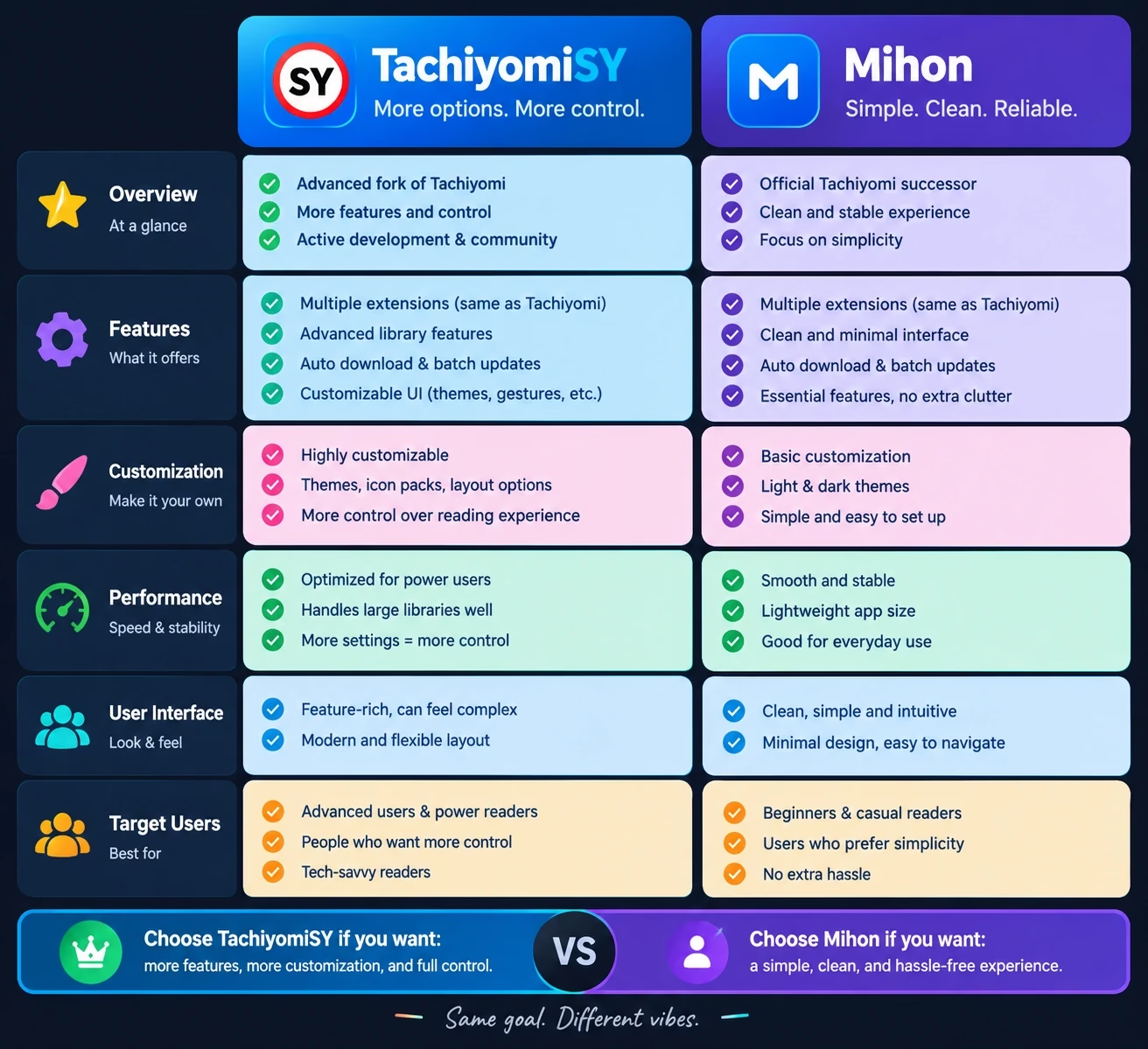
This is the comparison most readers want. Neither app is universally better. The right choice depends on how much you want to customize.
| Area | SY | Mihon |
|---|---|---|
| Base / project relationship | Branched from TachiyomiAZ, now aligned with Mihon as its base | Community-maintained continuation of the Tachiyomi codebase |
| Design / interface | Mihon-style layout with extra options | Cleaner, simpler interface |
| Features | Latest tab, extra library tools, recommendations and more | Core feature set, deliberately focused |
| Customization | Higher, with more settings to adjust | Moderate |
| Extension compatibility | Same extension model as Mihon | The base implementation of that model |
| Tracking | Supported, follows Mihon’s tracker changes | Supported |
| Target users | Heavy readers, large libraries, tinkerers | Readers who prefer a simpler app |
| Development approach | Takes Mihon’s changes, then adds SY features | Develops the core codebase itself |
| Updates | Typically arrive after Mihon’s changes are merged | Usually first to receive core fixes |
Which One Should You Pick?
- Choose SY if you follow many series, want the Latest tab or like having more controls.
- Choose Mihon if you want a simpler app that tends to receive core fixes first. Our Mihon guide covers it in detail.
- Try both if you are unsure. They use the same style of extensions, so switching is not a big commitment, though you should check backup and restore compatibility before moving a large library.
If you searched for “Mihon vs TachiyomiSY,” the answer is the same: it is a trade between simplicity and extra features, not good versus bad.
TachiyomiSY vs Original Tachiyomi
The original Tachiyomi is no longer actively developed, so this comparison is mostly about whether to keep using it.
- Development status: original Tachiyomi has stopped, while SY continues to receive releases.
- Codebase: SY follows Mihon’s code, which continues the Tachiyomi codebase.
- Features: SY has more of them.
- Extensions: both rely on the same style of extensions, though newer extensions may only be tested against current builds.
- Updates: an app that is no longer maintained will not get fixes when sources or Android change.
- User experience: very similar at first glance, which makes switching easy.
If you are still on the original app, our Tachiyomi alternatives page shows where to go next. For another popular branch of the family, see the TachiyomiJ2K guide.
Does TachiyomiSY Work on PC?
SY is an Android app. It has no native Windows or Mac version, so it does not run on a PC by default.
People who want it on a computer usually use an Android emulator or a similar compatibility layer. Expect some trade-offs: performance depends on your machine, touch-based reading feels different with a mouse, and not every setup runs smoothly. It is workable for some people, but it is not the experience the app was built for.
Because this is a common question, we cover the options in our guide to using Tachiyomi on PC.
Is TachiyomiSY Safe?
The honest answer is that it depends on where you get it and what you add to it. No software is 100% safe, and this guide does not claim otherwise.
- Open source. The code is public, so anyone can inspect it. That helps transparency, but it does not guarantee that every file you find online is the real thing.
- Trustworthy sources. Get the app from the project’s own GitHub page, not from random sites. Fake and re-uploaded APKs are the biggest practical risk.
- Modified APKs. Anything labeled a “mod APK” is not the project’s own build and can contain code the original developers never wrote.
- Extensions and repositories. Extensions run code inside the app, so only add repositories you trust.
- Permissions and privacy. Review the permissions the app asks for, and think about what accounts you sign in to, such as trackers.
For the full breakdown, read our dedicated guide on whether Tachiyomi is safe to use.
Common TachiyomiSY Problems and Fixes
| Problem | What to try |
|---|---|
| Extensions not appearing | Check that a repository is added and your internet works. Refresh the extension list, then restart the app. |
| Extensions not working | Update the extension. If the source changed its site, wait for an extension update. |
| Manga not loading | Try another source, check your connection, and clear the source’s cookies or cache if the option exists. |
| Repository problems | Confirm the repository address is correct and still active. Remove and re-add it if needed. |
| Chapters failing to load | Retry later, switch sources, or check whether the source itself is down. |
| Update problems | Lower your refresh frequency, update fewer categories at once, and make sure battery optimization is not stopping background work. |
| Reader problems | Reset reader settings, restart the app and update to the latest version. |
Two more general tips:
- If the app crashes at launch, check the project’s GitHub issues. Crashes that hit some devices have been fixed in a preview build before the stable release.
- Before reporting a bug, update to the latest version and read the changelog and existing issues.
For a longer walkthrough of extension errors, see our page on fixing extensions that are not working.
Frequently Asked Questions About TachiyomiSY
A free, open-source Android manga reader. It originally branched from TachiyomiAZ and now takes its core code from Mihon, while adding its own features.
Not simply. It originally branched from TachiyomiAZ, then later aligned with Mihon as its base. It follows Mihon’s changes but keeps its own identity and features.
Public release information shows it is still being updated. Whether it works well for you depends on your device, Android version and extensions. Check the project’s GitHub page for the latest status.
Indirectly, yes. It comes from the Tachiyomi family through TachiyomiAZ, and Mihon, which it follows, is a community-maintained continuation of the Tachiyomi codebase.
SY adds extra features and customization, such as the Latest tab. Mihon is simpler and tends to receive core changes first. See the comparison table above.
Neither is universally better. SY suits readers who want more options, and Mihon suits those who prefer a simpler app.
Yes. It uses the same style of extension system as the Tachiyomi and Mihon family. You install extensions yourself, usually through repositories.
Not natively. It is an Android app, so PC use means an emulator or a similar workaround. See our PC guide for the options.
It is open source, but safety depends on where you get it and which extensions you add. Use the official project source and avoid modified APKs. Details are in our safety guide.
They are separate forks with different feature sets and different bases. Our TachiyomiJ2K guide explains that project in detail.
Public release history shows ongoing releases, and preview builds also exist for earlier access to changes. Check the project’s GitHub page for the current version.
Final Thoughts for 2026
SY is a good fit for readers who want more control than Mihon offers and do not mind a larger settings menu. If you prefer a simpler app, Mihon is the easier choice. Both use the same style of extensions, so trying one does not lock you in. Version details change, so recheck the project’s GitHub page before relying on any specific release. For the bigger picture, our Tachiyomi forks overview compares the whole family.