
Best Tachiyomi Forks 2026 — Mihon, SY, J2K & Apps Like Tachiyomi
Tachiyomi Forks 2026: Mihon, SY, J2K & Apps Like Tachiyomi Ranked
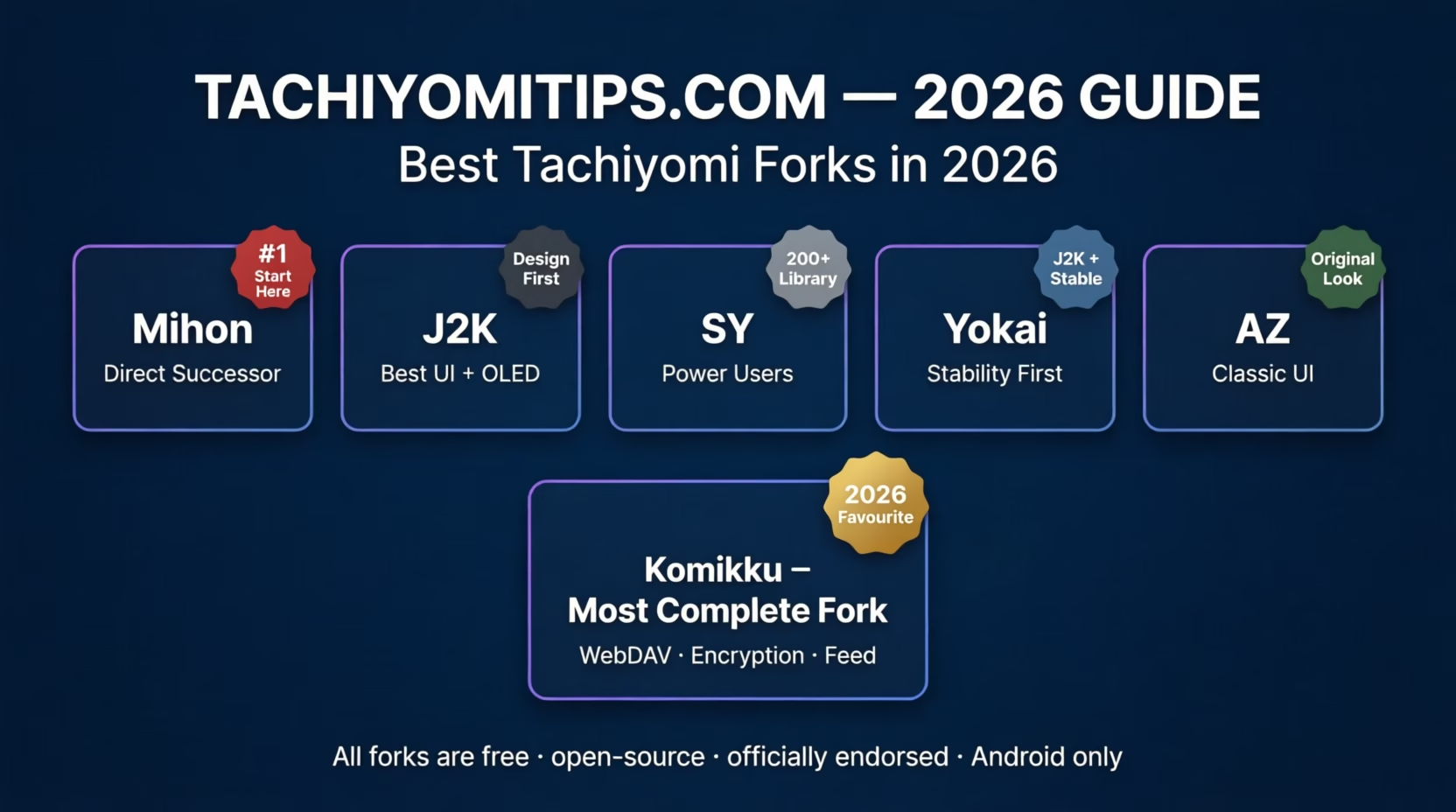
Tachiyomi shut down in 2024. But because it was always open-source under Apache License v2.0, the community forked the code and kept building. In 2026, there are six actively maintained Tachiyomi forks: all free, all open-source, all officially endorsed by the Mihon team. Whether you’re looking for better performance, new features, or just a different interface, these apps like Tachiyomi offer something for every type of reader.
If you want a manga app like Tachiyomi that keeps the exact same extension system, library format, and reading experience, exploring the best tachiyomi forks is exactly what you need. Check out our guides for PC and iOS users too.
Fork vs Alternative: The Difference That Protects Your Library
Most guides skip this explanation. They should not. When evaluating different tachiyomi forks and apps like tachiyomi, understanding this distinction helps you choose the right path for your library.
A Tachiyomi fork starts from the same Apache License v2.0 source code. It keeps the same .tachibk backup format, the same Keiyoushi extension architecture, and the same library structure. Switch from Tachiyomi to any fork or between forks and your entire library transfers in minutes. Reading progress, categories, tracker connections, and chapter history all carry over. Nothing is lost.
A Tachiyomi alternative is built on a completely different codebase. Your .tachibk file is incompatible. You start completely fresh. For anyone who has spent months building a Tachiyomi library, this difference decides everything before you even look at features.
The 6 Best Tachiyomi Forks & Apps Like Tachiyomi in 2026
1 Mihon: The Direct Tachiyomi Successor
Mihon is built by contributors from the original Tachiyomi team. It is also the upstream project every other fork now branches from, meaning every core improvement Mihon ships eventually reaches the other forks too.
The original Tachiyomi APK v0.15.3 still installs on most Android devices but receives zero updates, zero security patches, and zero Android compatibility fixes in 2026. Mihon is its actively maintained replacement. It introduced Material You dynamic theming for Android 12 and above, a smarter background library update system that reduces unnecessary data usage, and regular Android compatibility fixes.
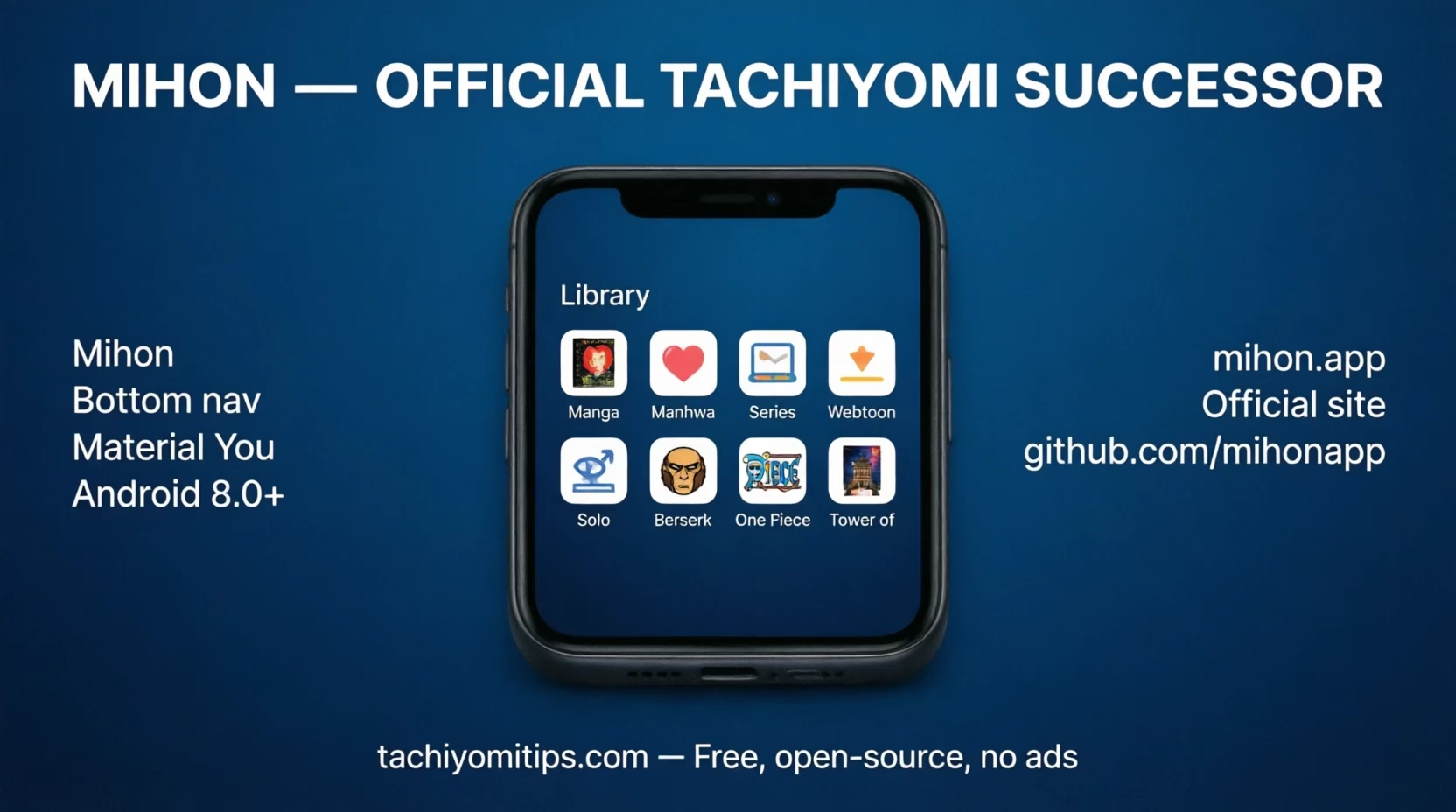
The one visible change from original Tachiyomi: Mihon uses a bottom navigation bar following Material 3 design guidelines, replacing the classic hamburger sidebar. If that change bothers you, TachiyomiAZ below restores the original layout completely without losing any of Mihon’s backend improvements.
Extensions are not bundled due to the same legal pressure that ended Tachiyomi. Add the Keiyoushi community repo manually in Settings → Browse → Extension Repos, install sources individually, and tap the shield icon to trust each one after every update. For a closer look, see our Mihon extensions guide and the Mihon extension repo list.
- Material You dynamic theming: Android 12 and above
- Active security updates and Android compatibility fixes in 2026
- AniList, MyAnimeList, Kitsu, Shikimori, and Bangumi tracker integration
- Smart background library update system
- Bottom navigation: Material 3 design
- Requires Android 8.0 or above
As one of the best apps like tachiyomi available today, Mihon provides a stable foundation for your manga reading journey. For users migrating from the original Tachiyomi or exploring Tachiyomi alternatives, Mihon offers the smoothest transition.
2 TachiyomiJ2K: Best Reading Experience and UI
TachiyomiJ2K is the oldest active Tachiyomi fork and consistently one of the most downloaded in 2026. The name comes from its Jetpack Compose and Kotlin rewrite, which gave it noticeably smoother animations, better memory handling for high-resolution manga pages, and a more refined visual design than both original Tachiyomi and base Mihon.
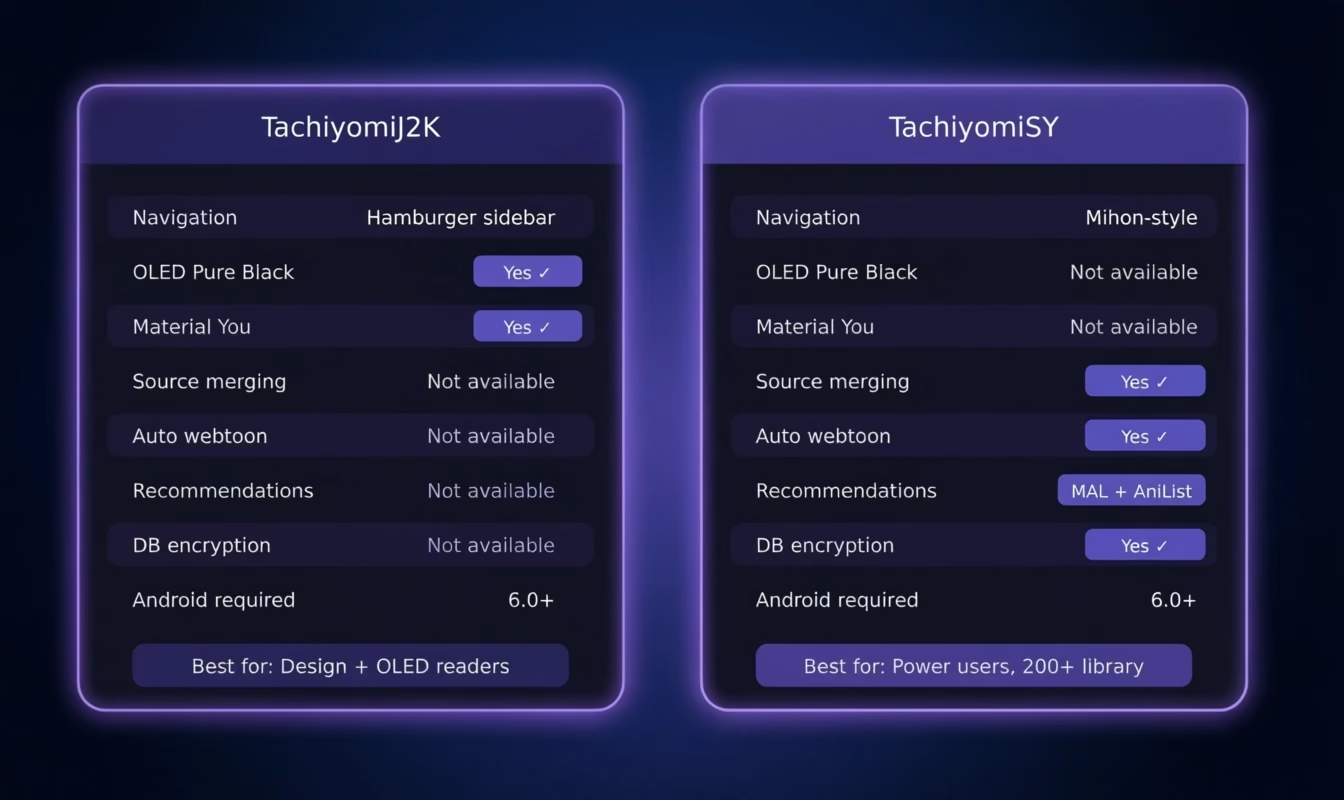
J2K keeps the classic hamburger sidebar navigation that Tachiyomi veterans prefer over Mihon’s new bottom bar. It also introduced Pure Black OLED theme earlier than any other fork, a genuine daily improvement for readers on AMOLED phones who read at night or in low light.
What J2K does not include: source merging, automatic webtoon detection, database encryption, device sync, or recommendation engine. It is focused entirely on making the daily reading experience excellent.
- Classic hamburger sidebar navigation: original Tachiyomi layout preserved
- Pure Black OLED theme: battery and eye comfort on AMOLED screens
- Material You dynamic theming: Android 12 and above
- Smoother page transitions and better memory handling for high-res pages
- Compact, comfortable, and cover-only library grid display modes
- Superior landscape and tablet reading mode
- Requires Android 6.0 or above
3 TachiyomiSY: Best for Power Users and Large Libraries
TachiyomiSY is the most feature-rich fork in the entire ecosystem. Among all available tachiyomi forks, SY stands out for users who manage massive libraries across multiple sources.
One critical note for 2026: always download the TachiyomiSY Preview APK, not the stable release. The Preview branch is actively maintained and is consistently treated as the reliable daily driver by the SY community. The stable branch lags behind on fixes.
Source merging is the feature that defines SY for power users. If you read a series on MangaDex but also track it on Mangakakalot or Batoto as a fallback, SY merges both entries into one library card with a single unified, correctly ordered chapter list. No other fork in this guide supports this.
Automatic webtoon detection is a SY exclusive that directly benefits manhwa readers. When you open a Korean manhwa from Toonily, Batoto, or any manhwa extension, SY detects the format automatically and switches the reader to webtoon mode without any manual input.
- Source merging: MangaDex, Mangakakalot, Batoto, Mangapark into single library cards
- Automatic webtoon detection: ideal for Toonily and all manhwa extension users
- MAL, AniList, and Neko-based recommendation engine inside the app
- Database encryption: extra privacy beyond standard secure screen
- Global update button: refresh all sources with one tap
- Advanced library sorting by series type, language, and publication status
- Always use Preview APK for best stability in 2026
- Requires Android 6.0 or above
4 Yokai: Stability-First Fork Built on J2K
Yokai is officially described by the Mihon team as a fork that “takes the best from J2K and enhances it.” It builds directly on TachiyomiJ2K with one clear priority: stability over feature velocity. Nothing ships until it is thoroughly tested, and reading reliability always comes before new additions.
In day-to-day use, Yokai and J2K feel nearly identical. Hamburger sidebar navigation, smooth reader, clean library management. The difference is under the surface: Yokai’s conservative release process produces fewer edge-case bugs for readers using many different source types simultaneously.
- Built directly on TachiyomiJ2K with additional stability improvements
- Hamburger sidebar navigation: same as original Tachiyomi and J2K
- Pure Black OLED theme: inherited from J2K
- Conservative release cycle: stability prioritized over new features
- Requires Android 6.0 or above
5 TachiyomiAZ: The Original Interface, Exactly Preserved
TachiyomiAZ was built to solve one specific problem: Mihon replaced the hamburger sidebar with a bottom navigation bar, and a significant part of the Tachiyomi community strongly preferred the original layout. AZ restores it completely, the sidebar menu, original browse tab structure, original settings layout, while running entirely on Mihon’s updated engine underneath.
Under the hood, TachiyomiAZ is Mihon. It receives the same core updates, security patches, and Android compatibility fixes. The only difference is the surface: the app looks and behaves exactly like Tachiyomi v0.15.3.
- Original Tachiyomi hamburger sidebar navigation: completely restored
- Original browse tab and settings layout: preserved exactly
- Runs on Mihon’s engine: all core and security updates included
- Full .tachibk backup import compatibility
- Requires Android 6.0 or above
6 Komikku: The 2026 Community Favourite
Komikku is officially described as “a fork with features from SY and Mihon plus added personal flair.” When ranking modern tachiyomi forks and apps like tachiyomi, Komikku consistently tops community recommendations for its versatility and active development.
Hidden categories is one of Komikku’s most practical exclusive features. Set entire library categories to be invisible in the default library view without deleting them, particularly useful for readers managing multiple content types in one library.
WebDAV sync makes Komikku the only Mihon fork that lets you synchronize your library and reading progress across multiple devices using a WebDAV server.
- Hidden categories: keep specific library sections out of default view
- WebDAV sync: only Mihon fork with WebDAV as a sync source
- Database encryption: same extra privacy layer as TachiyomiSY
- Browse Feed: chronological new chapter feed from followed sources
- Combines TachiyomiSY and Mihon features with original additions
- Better compatibility with Yuzono extension repository
- Requires Android 8.0 or above
All 6 Tachiyomi Forks Compared
When comparing these best tachiyomi forks and apps like tachiyomi side by side, you can see each one brings unique strengths to the table:
| Fork | Navigation | Android | OLED Theme | Auto Webtoon | Source Merge | DB Encrypt | WebDAV |
|---|---|---|---|---|---|---|---|
| Mihon | Bottom bar | 8.0+ | No | No | No | No | No |
| J2K | Hamburger | 6.0+ | Yes | No | No | No | No |
| SY | Mihon-style | 6.0+ | No | Yes | Yes | Yes | No |
| Yokai | Hamburger | 6.0+ | Yes | No | No | No | No |
| AZ | Original | 6.0+ | No | No | No | No | No |
| Komikku | Mixed | 8.0+ | No | Partial | Partial | Yes | Yes |
Which Tachiyomi Fork Is Right for You?
- Just migrated from Tachiyomi? Use Mihon. Safest starting point, foundation of everything else.
- Disliked Mihon’s navigation change? TachiyomiAZ for the exact original layout, or TachiyomiJ2K for the same sidebar with a better UI.
- Follow 200+ titles from MangaDex, Mangakakalot, Batoto, Toonily? TachiyomiSY Preview. Source merging alone justifies the switch.
- OLED phone, read at night? TachiyomiJ2K or Yokai. Both have Pure Black OLED theme.
- Found J2K occasionally unstable? Yokai. Same design quality, more conservative release process.
- Want the most complete single fork right now? Komikku.
How to Switch from Tachiyomi to Any Fork
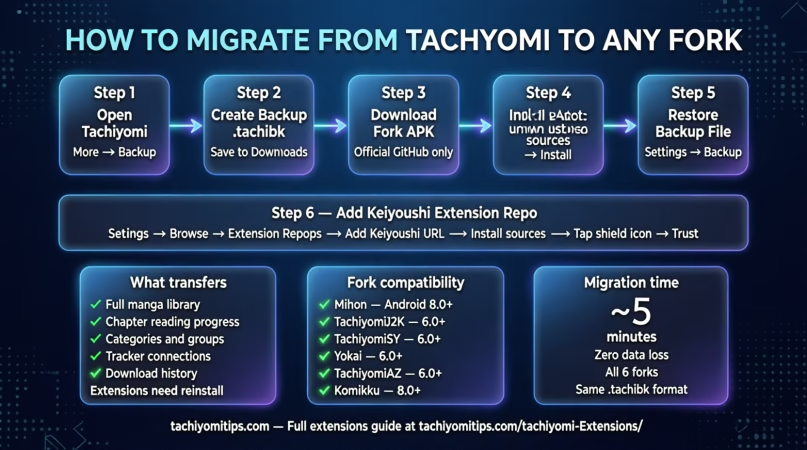
Switching between tachiyomi forks is straightforward when you follow these steps. Always verify your backup file is complete and accessible before testing different versions.
- Open Tachiyomi. Go to More: Settings: Backup: Create Backup. Save the
.tachibkfile to your Downloads folder. - Download your chosen fork APK from its official link above. Only use the official GitHub releases page, never a third-party APK site.
- Install the APK. Android will prompt “Install from unknown sources”, standard for any app outside the Play Store. Allow it for this install only.
- Open the fork. When asked for a downloads folder, point it to your existing Tachiyomi folder to keep offline chapters.
- Go to Settings: Backup: Restore Backup. Select your
.tachibkfile. Your full library restores automatically. - Add Keiyoushi repo in Settings: Browse: Extension Repos. Install sources and tap the shield icon on each to trust it. Add Yuzono too if you are using Komikku.
Frequently Asked Questions
Community discussions in 2026 consistently name Komikku as the top pick among users who have tested multiple forks. Mihon remains the safest starting point for new migrants.
Always use Preview. The SY community treats it as the reliable daily driver, the stable branch updates infrequently and lags behind on bug fixes and improvements. Read more in our TachiyomiSY guide.
TachiyomiSY automatic webtoon detection switches the reader to continuous vertical scroll mode automatically for webtoon content from Toonily, Batoto, and manhwa extensions. Komikku is a close second.
Yes. All six forks use the same .tachibk structure, so library, progress, and categories transfer completely. Switching between tachiyomi forks is completely safe as long as you use the standard backup format.
The best apps like Tachiyomi in 2026 are Mihon, TachiyomiJ2K, TachiyomiSY, Yokai, TachiyomiAZ, and Komikku. All six are free, open-source, and actively maintained with full library compatibility.
Yuzono is an extension repository that auto-merges Keiyoushi updates every six hours and adds Komikku-specific improvements. You only need it if you use Komikku, but if you do, adding it alongside Keiyoushi gives broader extension coverage.
Final Thoughts
These best tachiyomi forks and apps like tachiyomi are all free, open-source, and actively maintained in 2026.
Start with Mihon, the safest migration path and the foundation every other fork builds on. Move to J2K or Yokai if reading experience and OLED comfort matter most. Switch to SY for large libraries with manhwa and multi-source support. Use AZ if you want the original interface exactly as it was. Try Komikku for the most complete feature set any single fork offers right now.
Whichever of these tachiyomi forks you choose, you’re getting a powerful, customizable manga reading experience that builds on the legacy of the original Tachiyomi app.