
Mihon Extensions 2026: Keiyoushi Repo Setup & Installation Guide
Mihon Extensions: Keiyoushi Repo URL, Setup & Install Guide (2026)
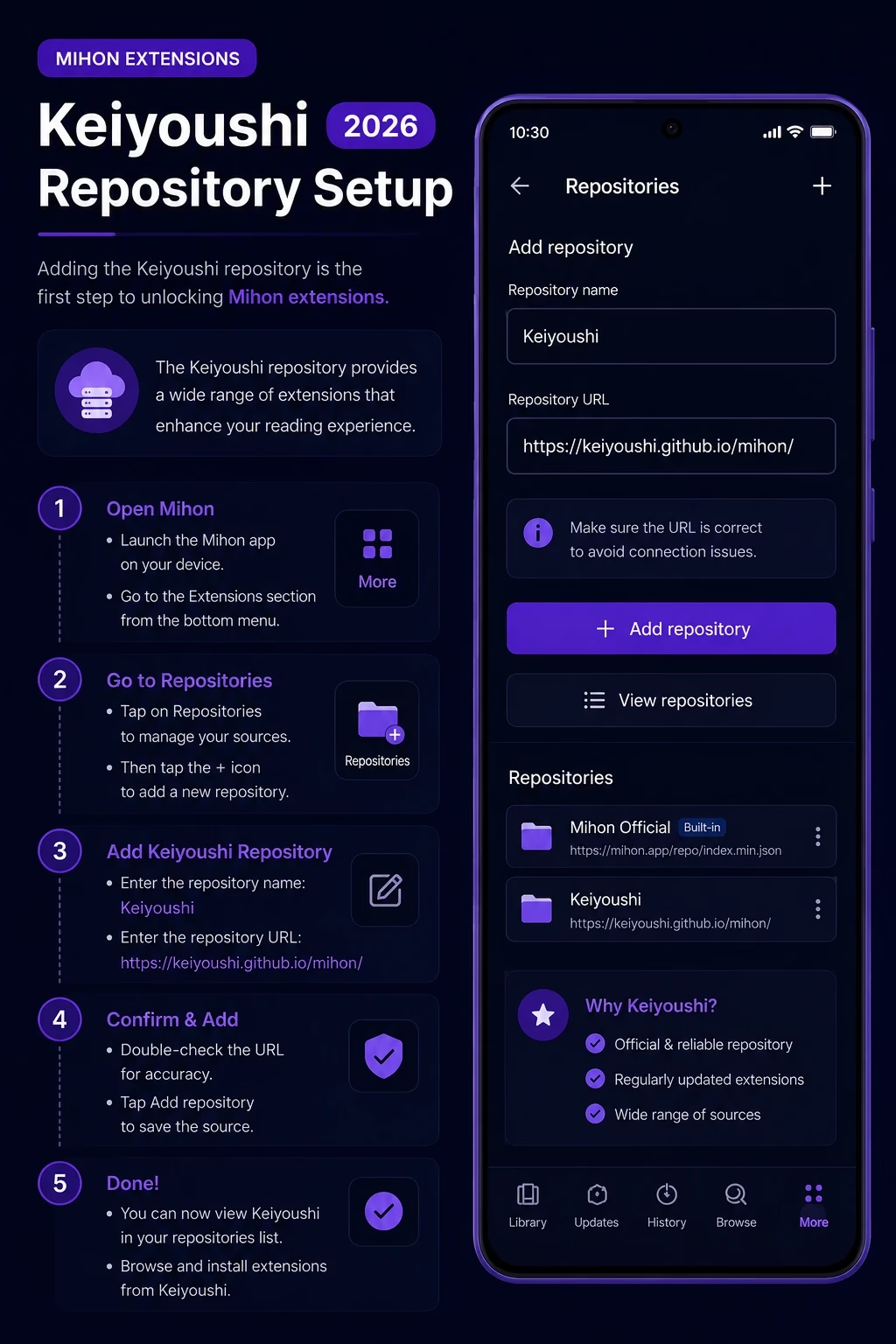
Mihon extensions are small add-ons that connect Mihon to individual manga websites. Mihon does not come with any, so the Browse tab looks empty until you add an extension repository. The most widely used one is Keiyoushi, and this guide shows the current URL, how to add it, how to install extensions, and what to check when something fails.
Quick answer: Go to More → Settings → Browse → Extension repos → Add and paste the URL below. Then open Browse → Extensions, refresh, and install the sources you want.
This is the URL listed in Keiyoushi’s official README. You can also add it through the Keiyoushi add-repo page.
Seeing a different URL elsewhere? Many older guides, including earlier versions of this one, show .../repo/index.min.json. Keiyoushi’s current README lists index.pb instead. If a link fails to add or your list loads empty, compare it with the official README first.
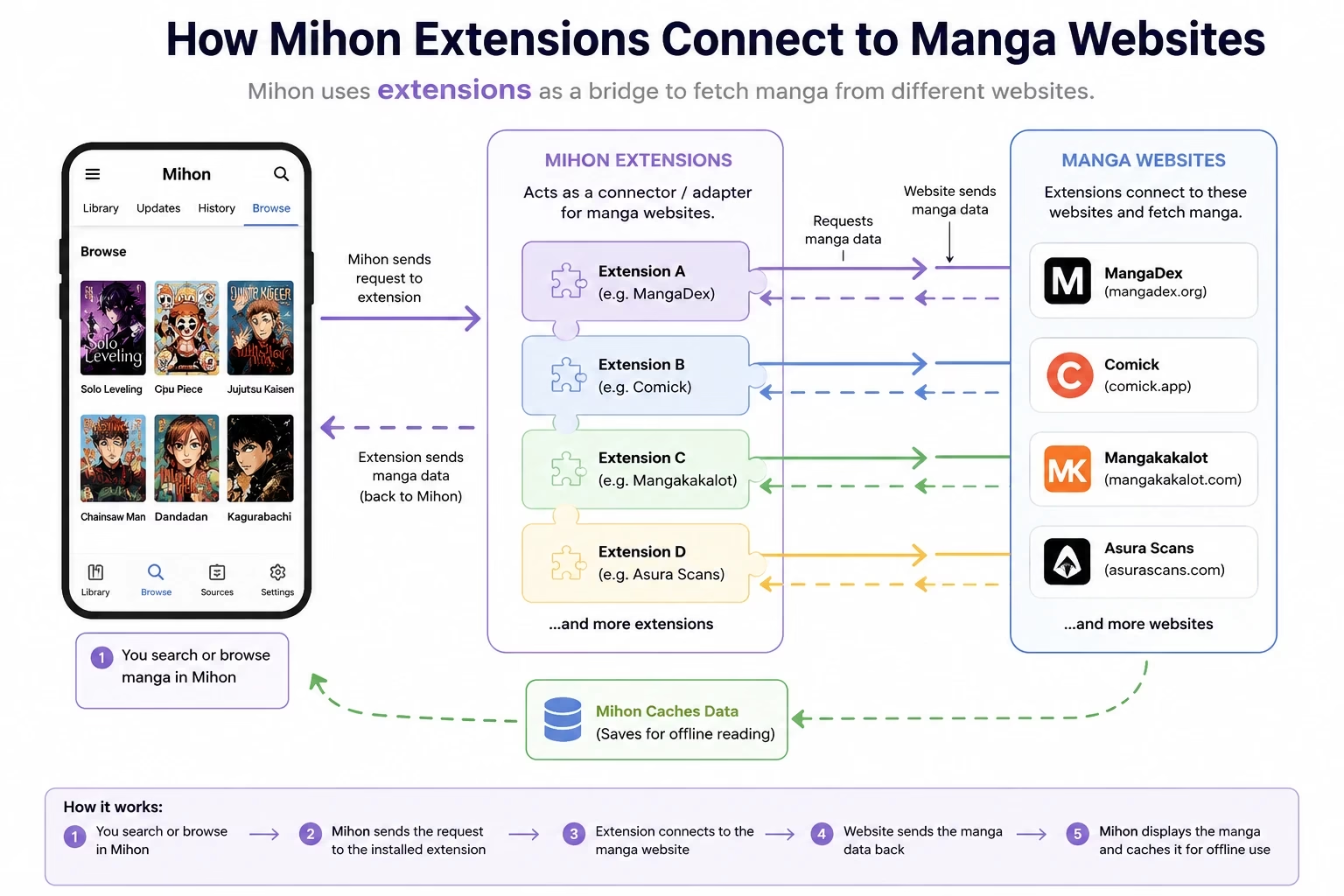
How Mihon Extensions Work
Mihon is the reader. Each extension is a separate app package that tells Mihon how to read one specific website. Because extensions are community-made, availability and quality depend on the website behind each one. If an extension stops working, the usual cause is a change on the source website, not a problem with Mihon itself.
Apps That Use Mihon-Style Extensions
Keiyoushi describes its repository as an extension repository for Mihon and variants. Variants can differ in app version, menu names, and the repository formats they accept, so check your own app before assuming a URL will work.
| App | What it is | Repo notes |
|---|---|---|
| Mihon | Tachiyomi’s community successor | Use the Keiyoushi URL above |
| Komikku | Mihon-based fork | Also supported by Yuzono’s repo, which is made for Komikku |
| Other forks | TachiyomiSY, TachiyomiJ2K, Yokai and others | Menu names and accepted URL formats vary, so check the fork’s own release notes |
For the differences between these apps, see the Tachiyomi forks comparison, or other manga reader alternatives if you want to look beyond Mihon.
How to Add the Keiyoushi Repository
The Keiyoushi extensions repository is a community project that continued the extension catalog after Tachiyomi was discontinued. Menu wording can change slightly between Mihon versions.
- Open Mihon, tap More, then Settings.
- Tap Browse, then Extension repos.
- Tap Add (the plus button).
- Paste the URL and confirm:https://github.com/keiyoushi/extensions/raw/repo/index.pb
- Go to Browse → Extensions and refresh the list. The catalog should load after a few seconds.
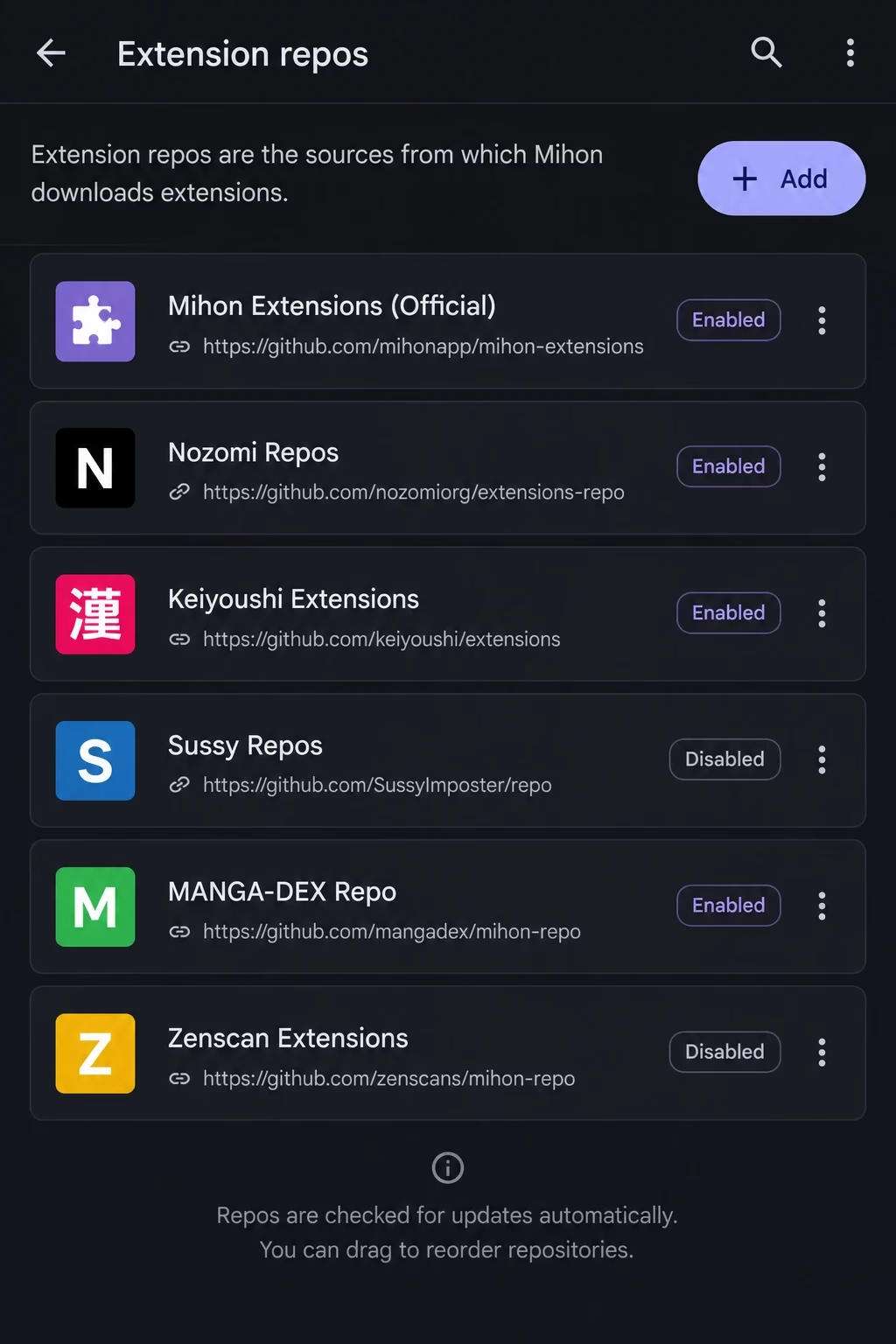
Prefer a ready-made list of repositories and their URLs? The Mihon extension repo list compares them, and the Tachiyomi extension repo guide covers the older Tachiyomi setup.
Installing and Updating Extensions
- Go to Browse → Extensions and search for the source by name.
- Tap Install next to the extension. If Android blocks it, allow Mihon to install unknown apps when prompted.
- If Mihon asks you to Trust the extension, review the prompt and approve it only if you want to use that source.
- Open Browse → Sources, tap the extension, and start browsing.
Updates appear in the same Extensions screen. Keep in mind:
- An extension only works while its source website is online and unchanged.
- Smaller sites tend to break more often than large ones.
- Content, chapter numbering, and quality come from the source website, not from Mihon.
Choosing Extensions
The catalog is large, and which sources are working changes often. Instead of installing random ones, start with a source you already know and check its status in the Extensions tab. Sources and their reliability change over time, so treat any list as a starting point, not a guarantee. For recommendations, see the best Tachiyomi extensions page, and for the wider catalog see the Tachiyomi extensions guide.
Sources flagged 18+ are hidden by default. To show them, go to Settings → Browse and turn on Show NSFW sources (18+).
Moving From Tachiyomi to Mihon
Restoring a backup brings back your library data, but extensions are separate apps, so plan to reinstall them.
- In Tachiyomi, go to More → Settings → Data and storage → Create backup (menu names can differ by version) and save the file.
- In Mihon, restore it from the backup/restore settings.
- Open Settings → Browse → Extension repos and check whether a repository is listed. If it is not, add the Keiyoushi URL again.
- Reinstall the extensions your library uses from Browse → Extensions.
Note: Whether a backup restores your repository list can depend on the app version. Always check the Extension repos screen after restoring rather than assuming it came back.
Extension Safety
Extensions are third-party code that runs inside an app on your phone, so no extension can be called completely safe. These habits reduce risk:
- Only add repositories you trust. Prefer the official Keiyoushi README over links shared in random chats or comments.
- Approve extensions deliberately. Read the Trust prompt and only approve sources you actually plan to use.
- Keep extensions updated and uninstall the ones you no longer use.
- Be careful with unofficial or modified repositories. Some repos are filtered copies of Keiyoushi and say plainly that they are not official.
Keiyoushi states that it has no affiliation with the content providers its extensions connect to. The legal status of reading from a particular site depends on your country and on that site, so check local rules yourself. For more on app safety, read is Tachiyomi safe.
Troubleshooting Mihon Extensions
These checks solve the most common problems. None of them is a guaranteed fix, since many failures come from the source website.
Mihon has no extensions by default. Add a repository, then refresh the Extensions tab. If you already added one, check your connection and compare your URL with the official README.
Copy the URL again with no extra spaces or line breaks. Compare it with the official Keiyoushi README, since older index.min.json links from outdated guides may no longer work. If it still fails, update Mihon, since app versions can differ in which formats they accept.
Check for an update in Browse → Extensions. If none exists, open the source website in your browser to see whether it is down or changed. Problems can be reported in the Keiyoushi issue tracker, but fixes depend on volunteers and are not guaranteed.
These usually come from the source site’s protection or a temporary error. Try opening the source in Mihon’s built-in WebView option if it appears, update Android System WebView or your browser, and try again later. See fixing the Cloudflare bypass error and fixing error 404 for more detail.
Confirm the extension was approved if Mihon showed a Trust prompt, and that it is up to date. If many extensions fail at once, see extensions not working for a longer checklist.
Keiyoushi vs Other Repositories
| Repository | What it is | Notes |
|---|---|---|
| Keiyoushi | Main community repo for Mihon and variants | Official README lists index.pb |
| Yuzono | Repo for Komikku, Mihon and forks | Says it merges Keiyoushi updates every 6 hours and adds extras |
| Filtered or custom repos | Third-party copies or niche sources | Unofficial, so use at your own risk |
Most readers only need Keiyoushi. Full URLs and comparisons are on the Mihon extension repo list.
Frequently Asked Questions
Go to More → Settings → Browse → Extension repos, tap Add, and paste https://github.com/keiyoushi/extensions/raw/repo/index.pb. Then open Browse → Extensions, refresh, and install the sources you need.
Keiyoushi’s official README currently lists https://github.com/keiyoushi/extensions/raw/repo/index.pb. You can also use the Keiyoushi add-repo website. Older guides show an index.min.json link, so check the official README if one fails.
Mihon does not ship with extensions. Add a repository, refresh the tab, and check your connection and the URL if it is still empty.
Keiyoushi describes its repo as an extension repository for Mihon and variants, and it replaced the discontinued Tachiyomi catalog. Compatibility can still vary by app version. The Tachiyomi extensions guide covers the older setup.
Usually the source website changed, went offline, or added protection such as Cloudflare. Update the extension first. Fixes depend on volunteer maintainers and are not guaranteed to be quick.
They are third-party code, so none can be called completely safe. Add only trusted repos, approve extensions deliberately, keep them updated, and remove ones you do not use.
Summary
Add the Keiyoushi repo in Settings → Browse → Extension repos, refresh the Extensions tab, then install and approve the sources you use. If the link fails, check the official Keiyoushi README for the current URL.
For everything else the app offers, see the Mihon overview, or the how-to-use guide if you are new to manga readers.