
Best Mihon Extension Repo List: GitHub Repositories & Fixes 2026
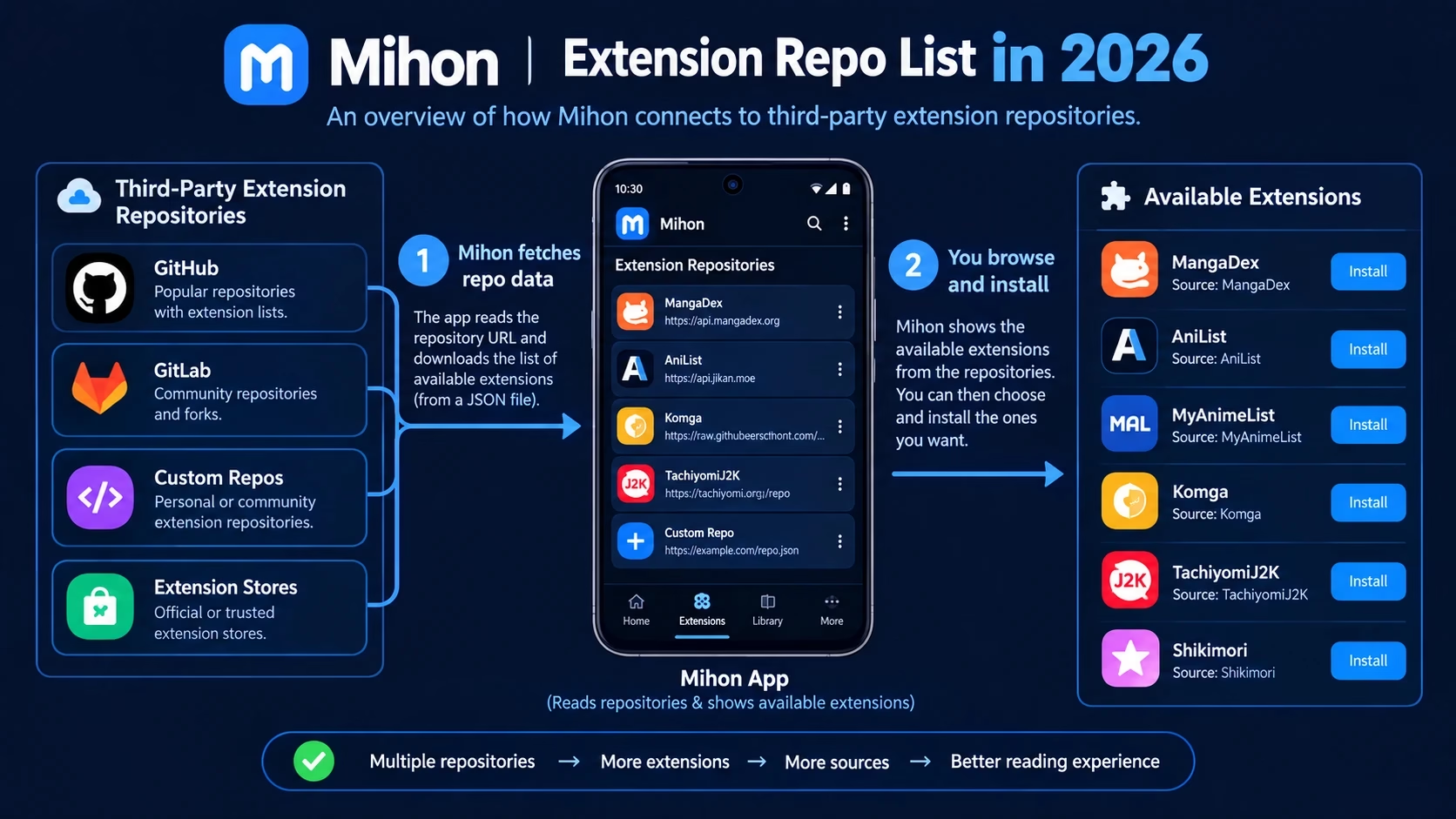
A Mihon extension repo list is a directory of the third-party repositories that can supply extension catalogs to Mihon and compatible apps. People search for one because the names and links do not line up. One guide points to Keiyoushi, another to a Yuzono URL, a third to a fork nobody recognises, and some GitHub pages that look relevant turn out to be ordinary source code with no catalog behind them.
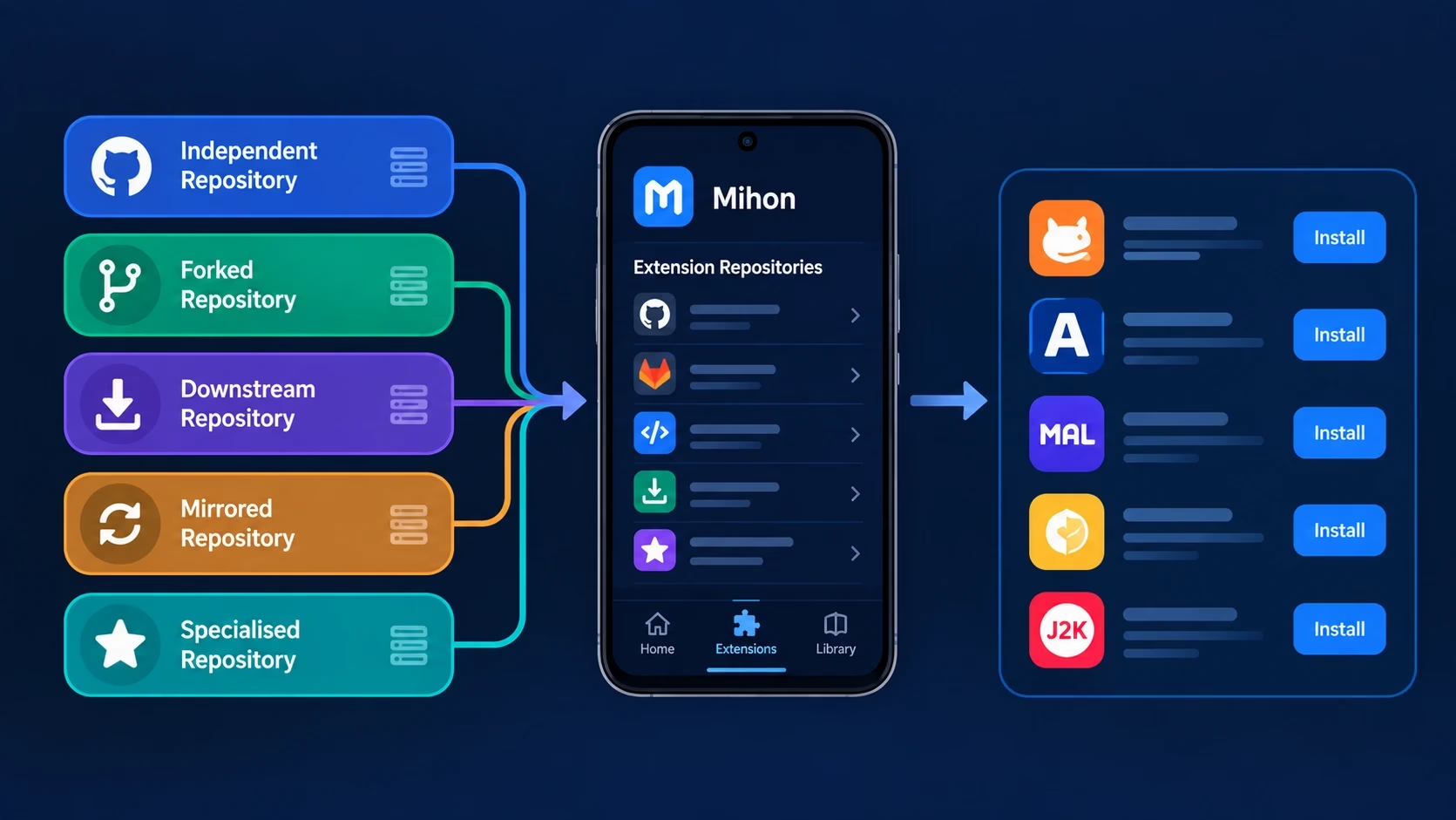
This Mihon extension repo list is a discovery directory, not a setup tutorial. Below you will find a factual table of repositories that can be checked on GitHub, an explanation of repository types (independent, downstream, fork, mirror, archived), a method for telling a real repository from a plain GitHub page, and a checklist for judging whether one is still current. Nothing here is ranked. For app basics, see the Mihon app guide; for adding a repository, use the Mihon extensions guide. The app itself is developed openly in the mihonapp/mihon repository on GitHub.
Quick answer: the Mihon extension repo list verified for this article covers Keiyoushi, Yuzono’s manga-repo, Mihonyomi (self-hosted servers), and a few forks or archived projects. Their catalogs overlap, and a GitHub page only counts as a repository if it publishes a metadata index file.
Mihon Extension Repo List Terms: Repo vs Extension Store
Searches still use “Mihon extension repo,” but the app itself has changed its wording. The Mihon v0.20.0 release notes state that the terms “extension repo” and “obsolete” were changed to “extension store” and “orphaned.” If you use an older build, you may still see the old label; on newer builds you will see the new one.
The two phrases refer to the same thing: a URL that points to a metadata index describing which extension packages exist. That index is not the extensions themselves, and it is not Mihon. In this Mihon extension repo list, “repository” and “store” are used interchangeably, and “repository” is kept where it matches how people search.
Eight Terms You Will See in Any Mihon Extension Repo List
| Term | What it actually is |
|---|---|
| Mihon | The reader application. It hosts no catalog of its own. |
| Extension repository / store | A published catalog of extensions, described by an index file. |
| GitHub repository | Any project on GitHub. Only some of them publish an extension catalog. |
| GitHub fork | A copy of another project. It may be a source copy, or a maintained catalog with changes. |
| Mirror | A copy or re-host of another repository, usually pointing to the original URL. |
| Extension package | The APK you install for one source or group of sources. |
| Manga source | The website or server an extension reads from. |
| Extension source code | The Kotlin code that builds packages. It is separate from the published catalog. |
For a wider look at extensions themselves, our Tachiyomi extensions guide covers what individual packages do.
Mihon Extension Repo List for 2026: Verified GitHub Repositories
The Mihon extension repo list below only includes projects whose GitHub pages could be read while writing this article. Statuses reflect what those pages showed on September 29, 2026, and can change. “Type” describes how the project relates to others, not its quality. Raw index URLs are given only where a project’s own README states them; for everything else, copy the link from the current README.
| Repository | GitHub / Source | Type | Mihon Compatibility | Main Purpose | Status |
|---|---|---|---|---|---|
| Keiyoushi Extensions | keiyoushi/extensions (catalog); keiyoushi/extensions-source (code) | Independent community repository | Described as an extension repository for Mihon and variants | General manga extension catalog | Active – organisation page showed updates on Sep 28, 2026 |
| Yuzono manga-repo | yuzono/manga-repo (catalog); yuzono/tachiyomi-extensions (code) | Downstream project that merges Keiyoushi and adds its own changes | Stated as compatible with Komikku, Mihon and forks | Keiyoushi content plus a few extra or improved extensions | Listed on GitHub – verify recent commits |
| Yuzono cursed-manga-repo | yuzono/cursed-manga-extensions (code); URL in README | Separate Yuzono catalog | Stated as for Komikku, Mihon and forks | Scope differs from the main repo – read its README first | Check README |
| Mihonyomi extensions | kitsumed/mihonyomi-extensions | Independent, specialised | Supports Tachiyomi and forks that kept extension support, such as Mihon | Extensions for self-hosted servers (author built it for Komga) | Limited – author says new extensions are unlikely |
| MiguelMA3 mihon-extensions | MiguelMA3/mihon-extensions | Filtered fork of Keiyoushi | Described as a repository for Mihon and variants | Keiyoushi catalog with specific content removed by a workflow | Unofficial – self-described as modified |
| tachiyomi-extensions-revived | timschneeb/tachiyomi-extensions-revived (README references the ThePBone path) | Earlier independent repository | Written for Tachiyomi v0.15.2 and later | Restored removed extensions | Archived – points users to Keiyoushi |
Not in the table on purpose: projects such as Arihany/extensions-source (a fork of Keiyoushi’s source code with no releases), Mihon-based apps like Mihon+, or backup converters such as mk-bkconv. They are related to the ecosystem, but they are not extension repositories, so they do not belong in a Mihon extension repo list.
Keiyoushi in the Mihon Extension Repo List
Keiyoushi is the repository most guides start with. It is hosted on GitHub under the keiyoushi organisation. The catalog lives in keiyoushi/extensions, whose About line describes it as an extension repository for Mihon and variants, and the Kotlin code that builds extensions lives separately in keiyoushi/extensions-source. Issues and source requests are handled in the source repository.
It is a third-party project, not part of Mihon. Its own README says it is not affiliated with Mihon or Tachiyomi and asks users not to seek help for these extensions through Mihon’s support channels. Its README also points to a Keiyoushi website with an add-to-app flow and a manual listing page.
One detail worth noticing: the current README on the repo branch lists an index.pb URL, while many older guides show an index.min.json link. Mihon v0.20.0’s notes mention support for a newer extension index format, so the file type your build accepts can matter. Always copy the link from the current README rather than from a screenshot. If you are on an older app build, our Tachiyomi old version page explains what changes between releases.
For step-by-step setup, use the setup guides linked at the start of this article.
Other Repositories in the Mihon Extension Repo List
Yuzono manga-repo. The project README says its catalogs are compatible with Komikku and Mihon or other forks, and that it automatically merges Keiyoushi updates every six hours while adding a small number of its own extensions and improvements. That makes it a downstream repository, not a fully separate catalog. It also states it is not affiliated with Komikku, Mihon or Tachiyomi. The README advises using the yuzono/manga-repo URL even when copies of the project exist under other GitHub accounts, which is a good example of mirrors and forks appearing in search results. Komikku and other apps that use these repositories are compared in the Tachiyomi forks guide.
Yuzono cursed-manga-repo. Yuzono’s organisation also lists cursed-manga-extensions as source code for Komikku, Mihon and forks. A forked copy of its catalog README tells users to keep using the yuzono/cursed-manga-repo URL. Its scope is not the same as the main repo, so read the README before adding it.
Mihonyomi. This repository is aimed at self-hosted servers. Its README says compiled APKs sit in a releases branch and source on main, warns that closed-source extensions and fake compatible readers have appeared, and says it was made for the author’s own Komga use. It points Kavita users to Kavita’s own extension instead.
Filtered forks. MiguelMA3/mihon-extensions describes itself as a filtered fork of Keiyoushi that removes listed content through a workflow before generating index files, and warns that it is unofficial and modified. It is clearly a fork, and its catalog is a subset of the original.
Archived projects. tachiyomi-extensions-revived is archived and asks users to migrate to Keiyoushi. It remains a useful case study: old links found in older tutorials can point to projects that no longer accept updates.
Mihon Extension Repo List: How GitHub Sources Work
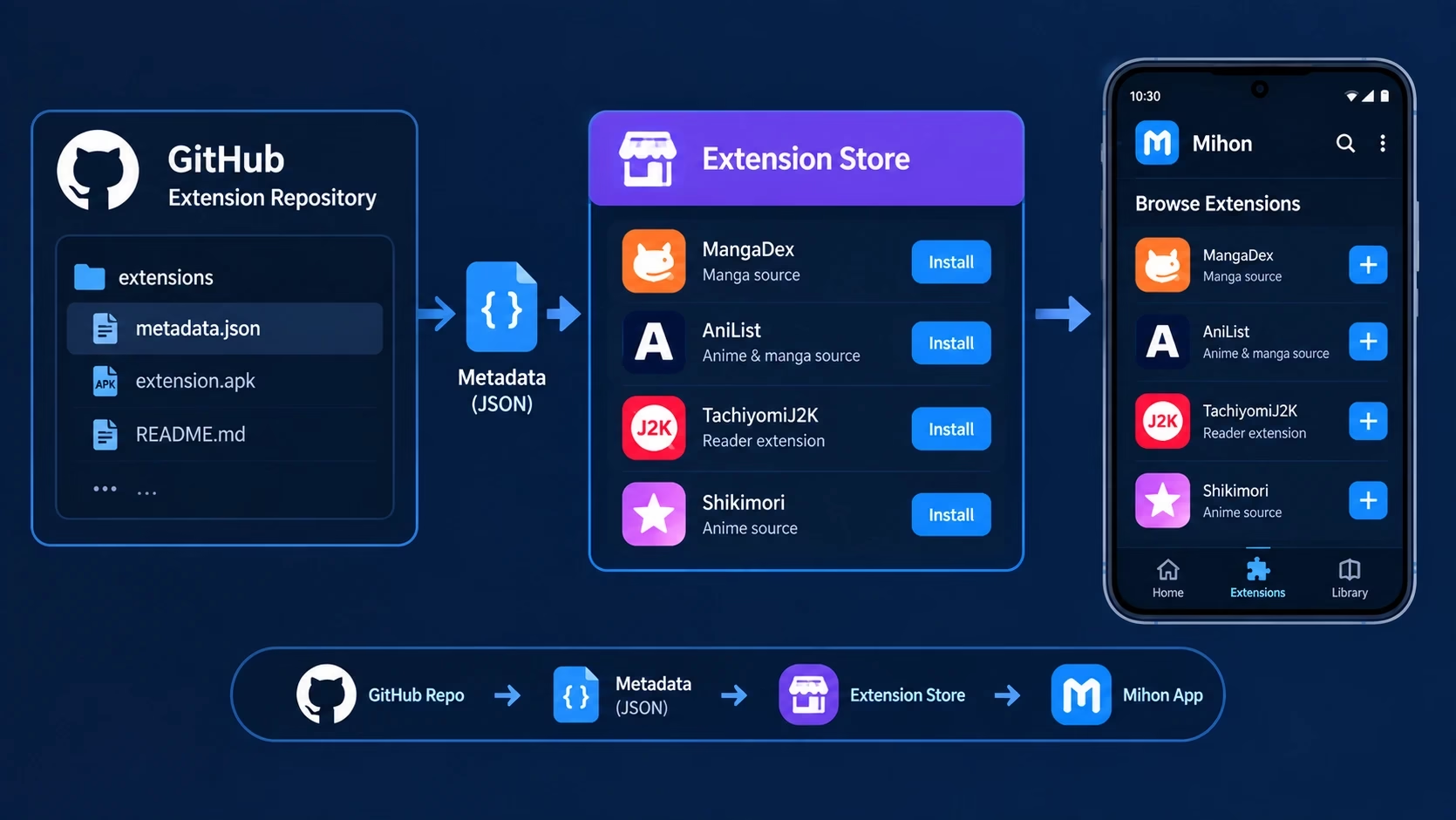
GitHub is the usual host because it gives free file hosting, automated builds, public history and an issue tracker. A repository maintainer typically builds packages with GitHub Actions and publishes them, along with an index file, on a dedicated branch. Users then add a raw link to that index in the app.
That means a GitHub page is not automatically an extension repo. When you land on one, look for:
- README: does it describe itself as an extension repository and say which apps it supports?
- Index files: is there a published
index.min.json,index.jsonorindex.pb, usually on arepoorreleasesbranch? - Release or branch history: is the metadata branch updated regularly?
- Issues: are reports answered, closed or ignored?
- Commits and activity: when was the last meaningful change?
- Ownership: is the account or organisation the same one the README links to?
Mihon Extension Repo List Beyond Keiyoushi
Readers asking for a Mihon extension repo other than Keiyoushi usually want to know what else exists and whether it is different. Based on the projects in this Mihon extension repo list, the honest answer is that most alternatives are related to Keiyoushi in one way or another.
Whether their catalogs differ in practice is something only the current index can show, so this article does not claim which extensions any repository contains. Before adding one, verify who maintains it, when it was last updated, whether it lists your app as supported, and whether its README explains what was added or removed. Two repositories that carry the same extension can create duplicate entries, so add only what you need. If you are after sources to install rather than repositories to compare, see the best Tachiyomi extensions list.
Mihon Extension Repo List Links: How to Verify a Repository URL
Many failed links come from copying the wrong kind of URL. These five look similar but do different jobs:
| Link type | Looks like | Use it in the app? |
|---|---|---|
| GitHub repository page | github.com/owner/name | No – for reading the README and history |
| README installation link | A button or link the README labels for adding the repo | Yes, if the README says so |
| Raw index URL | raw.githubusercontent.com/…/index.min.json | Yes |
| Metadata file page | A github.com/…/blob/… page showing the file | No – use the raw or README-provided link |
| Source-code repository | A repo with Kotlin folders and no published index | No |
Short checklist: get the link from the maintainer’s README; confirm the owner name matches; confirm it ends in an index file the README mentions; check the file loads in a browser as data rather than a web page; and compare the branch name to the README. If a tutorial and a README disagree, trust the README. Setup itself is covered in the Tachiyomi extension repo guide.
How to Evaluate Any Mihon Extension Repo List Entry
Instead of asking which repository to pick, ask whether a given repository passes a basic review. These ten checks apply to every project in the Mihon extension repo list, and to any new one you find later.
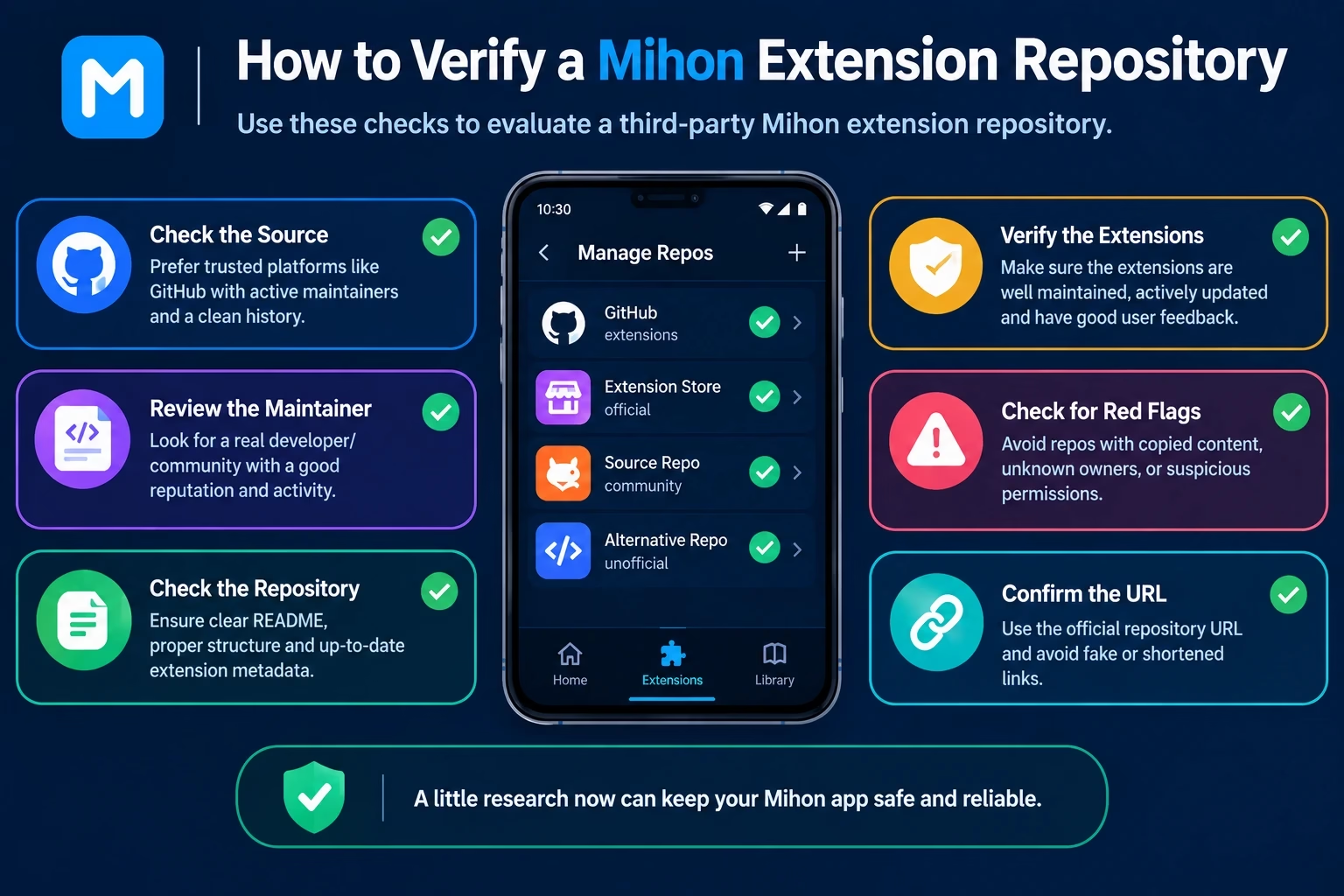
- Clear repository owner. A named person or organisation, with a consistent link from README to profile.
- Current maintenance. Recent commits and metadata updates, not a last change from years ago.
- Mihon compatibility. The README says which apps it supports, and the index format suits your build.
- A clear README. It explains what the repository is, who runs it and what it contains.
- Valid metadata. A published index file that loads without error.
- Transparent source code. Public build code, ideally with an open-source license, so packages can be traced back to source.
- Issue tracking. Issues enabled and being handled, so problems have somewhere to go.
- Update history. A visible record of what changed and when.
- Clear installation instructions. A README that names the exact link to use, so you are not guessing.
- Security considerations. Mihonyomi’s README warns that closed-source extensions and fake compatible readers have appeared. Prefer open source, be cautious with unexplained packages, and check what the trust prompt shows.
Rule of thumb: if you cannot answer who runs it, whether it is still updated, and where the source is, do not add it.
Are Mihon Extension Repositories Official?
Mihon is the application. The repositories in this Mihon extension repo list are separate projects run by other people. Keiyoushi’s README says it is not affiliated with Mihon or Tachiyomi, and Yuzono’s README says the same about Komikku, Mihon and Tachiyomi. Mihon’s changelog describes support for extension formats, but that is not an endorsement of any specific repository.
So the practical position is: no third-party repository should be treated as an official Mihon product unless Mihon’s own documentation says so. Check ownership on GitHub yourself, and treat labels like “official” on other websites as claims to verify. These repositories are built for Android apps; iPhone readers should look at the Tachiyomi for iOS page instead.
Mihon Manga Extension Repo vs Anime Extension Repo
A Mihon manga extension repo generally lists extensions for reading manga, comics and similar content. Anime extensions belong to a different ecosystem. The Yuzono organisation, for example, lists aniyomi-extensions as separate source code for Anikku, Aniyomi and forks, distinct from its Komikku and Mihon repository.
The point is not to explore Aniyomi here. It is to avoid assumptions: a link that works in a Mihon-compatible app does not mean the repository has anime content, and searches for a “Mihon anime extension repo” can lead to projects meant for other apps. Read the README, look at the app names it lists, and confirm the content type before adding it. If you are weighing different reader apps altogether, see the Tachiyomi alternatives page, and find more guides on the TachiYomiTips home page.
What If a Mihon Extension Repo List Entry Is No Longer Available?
- The URL may have changed. Projects get renamed or moved. Yuzono’s README, for instance, advises keeping one specific URL regardless of where the GitHub repository sits.
- The project may be archived. An archived repository is read-only; the README often names a successor.
- Metadata may be gone. A deleted branch or index file leaves a link that returns an error.
- Forks may exist. Treat them as separate projects with their own owners and check each one.
Start with the project’s current README and recent activity. For extension-level problems, see the fix extensions not working guide, and if adding a link returns a 404, read the Tachiyomi error 404 fix.
Mihon Extension Repo List: Frequently Asked Questions
It is a directory of third-party repositories that publish extension catalogs Mihon and compatible apps can read, described by owner, GitHub source, type, compatibility and status.
Start with project READMEs such as keiyoushi/extensions or yuzono/manga-repo. A genuine repository describes itself as an extension repository and links to an index file.
Yes, including Yuzono’s manga-repo, the self-hosted-focused Mihonyomi and filtered Keiyoushi forks. Many overlap with Keiyoushi, so read each README for differences.
No. It is an independent community project, and its README says it is not affiliated with Mihon or Tachiyomi.
Copy it from the maintainer’s README, confirm it points to an index file rather than a normal GitHub page, and check that the owner matches the project you expect.
They describe the same concept. Mihon v0.20.0 changed the in-app wording from extension repo to extension store, though people still search the older phrase.
Only if the fork publishes repository metadata and its maintainer intends it to be added to an app. A fork of source code alone is not a usable repository.
The project may have moved, been archived, or removed its metadata branch, or the link may point to a page instead of an index file. Check the current README.
Look at recent commits, the update history of the metadata branch, issue activity and whether the repository is archived.
No. Some merge another catalog and add extras, some filter content out, and some focus on niches such as self-hosted servers.
There is no single best repository. Keiyoushi is the general-purpose catalog most guides start with, Yuzono’s repo merges Keiyoushi and adds extras, and Mihonyomi is for self-hosted servers. Pick by your needs, then check the README and recent activity.
On GitHub. Read the README of projects such as keiyoushi/extensions or yuzono/manga-repo, or use the table above. Tachiyomi’s development has ended, so these repositories mainly target Mihon and its variants.
Mihon itself ships no extension repository; they are third-party. Keiyoushi’s README currently lists https://github.com/keiyoushi/extensions/raw/repo/index.pb, while older guides use an index.min.json link. Always copy the link from the current README. The app’s own code is at github.com/mihonapp/mihon.
There is no single best one. It depends on the source and language you read. Choose the extension for your source and check that it is up to date.
Summary: Mihon Extension Repo List 2026
This Mihon extension repo list describes third-party sources, not part of Mihon itself. You will meet Keiyoushi, downstream projects like Yuzono’s, specialised repositories and forks, and a GitHub page is not automatically an extension repository. Before trusting one, verify ownership, Mihon compatibility, published metadata and recent maintenance. “Extension repo” and “extension store” are related terms for the same idea, and statuses on GitHub can change, so recheck a project’s README before relying on it.