
Mihon APK 2026 – Best Free Tachiyomi Successor (Download & Setup)
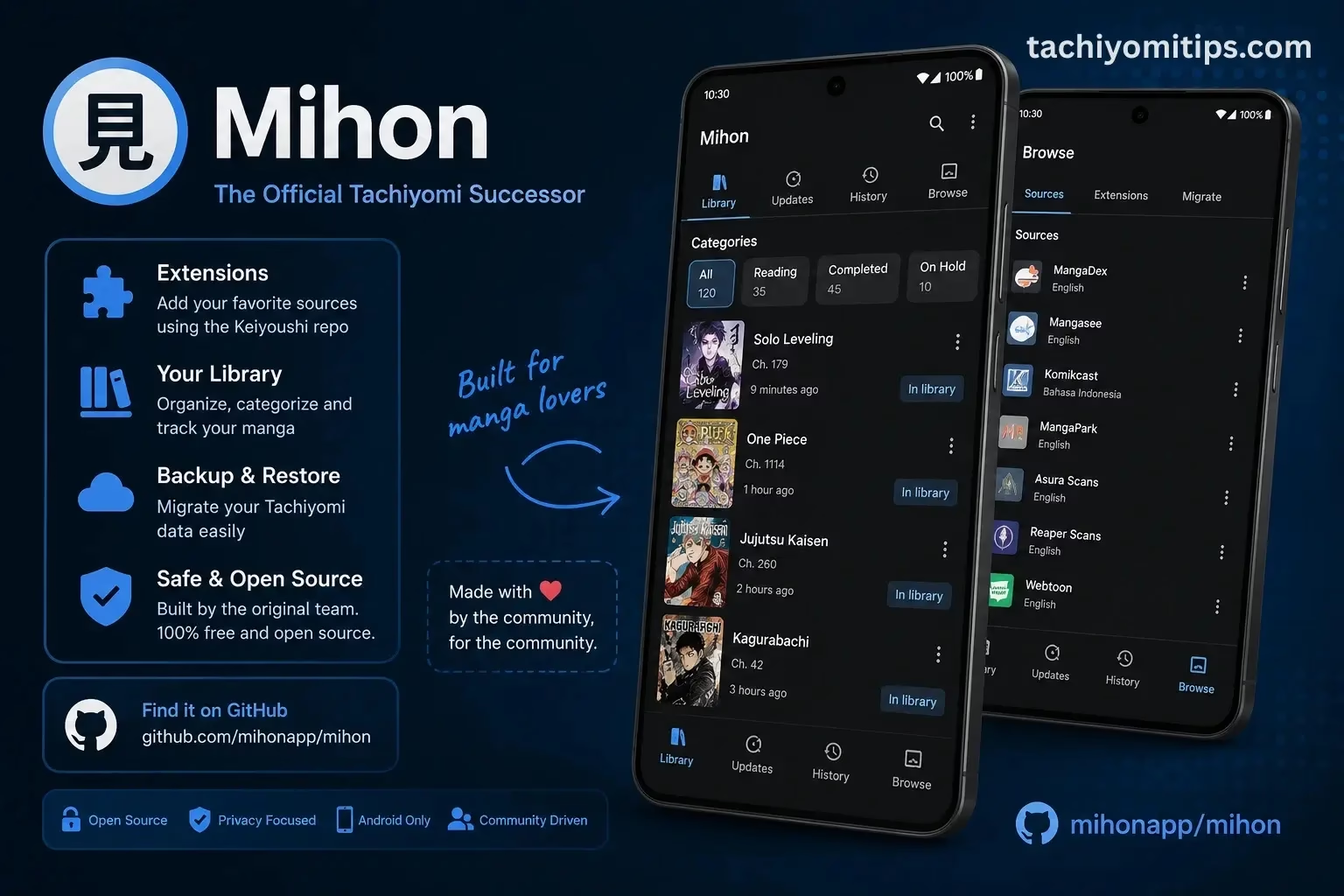
If you are looking to download Mihon in 2026, you have come to the right place. It is a free, open-source Android manga reader built by contributors from the original Tachiyomi team after the app shut down in 2024. Everything you loved about the original app is preserved here: the same extension system, the same library format, the same reading experience, with Material You theming and active security updates added on top.
This guide covers what the app is, how to install it safely, how to set up extensions, how it compares to the original, and answers to the most common questions readers ask in 2026.
Mihon APK Info
| App Name | Mihon |
|---|---|
| Developer | Former Tachiyomi contributors |
| Platform | Android |
| Android Required | Android 8.0 or higher |
| License | Open Source, Apache License 2.0 |
| Price | Free, No ads, no subscriptions |
| Extension System | Keiyoushi community repository |
| Backup Format | .tachibk (same as original Tachiyomi) |
| Last Updated | June 2026, Actively maintained |
What is Mihon?
Mihon is a free, open-source Android application for reading manga, manhwa, manhua, and webtoons. It does not host any content itself. Instead, it connects to manga libraries worldwide through an extension-based system, exactly like the original app always did.
The name comes from the Japanese word 見本, meaning “sample” or “model.” It represents a clean starting point that other forks can build upon. In fact, it is now the upstream project that every major Tachiyomi fork branches from, meaning core improvements here eventually reach TachiyomiSY, TachiyomiJ2K, and every other fork in the ecosystem.
When Tachiyomi officially shut down in May 2024 following DMCA pressure from major manga publishers, the original development team did not disappear. They rebuilt under a new name, preserving the full reading experience while establishing a legal structure that allows continued development.
Key fact: This is not a copycat or unofficial remake. It is the direct continuation of Tachiyomi built by the same people who created it. The only difference is the name and a new bottom navigation bar replacing the classic hamburger sidebar.
Why It is the Best Tachiyomi Replacement in 2026
The original Tachiyomi APK v0.15.3 still installs on most Android devices in 2026. But it is completely frozen with no updates, no security patches, no new Android compatibility fixes, and no extension maintenance from the original team. For readers who built their entire manga library around the original app, this is the only replacement that guarantees zero library loss and zero learning curve.
Active Updates
Regular bug fixes, security patches, and Android 15 compatibility in 2026.
Material You
Dynamic color theming from your wallpaper on Android 12 and above.
Same Extensions
Full Keiyoushi community repository support. Same sources, same setup.
Zero Data Loss
Same .tachibk backup format. Your entire library migrates instantly.
Tracker Support
MyAnimeList, AniList, Kitsu, Shikimori, Bangumi, all synced automatically.
Offline Reading
Download chapters to your device. Read anytime without internet.
Features Complete Overview
The app retains every feature from the original while adding meaningful improvements built specifically for 2026 Android devices:
- Material You dynamic theming automatically extracts colors from your wallpaper on Android 12 and above for a seamless, premium look
- Smart background library updates with reduced data usage and battery consumption compared to the original update system
- Bottom navigation bar following Material 3 design guidelines, replacing the classic hamburger sidebar
- Full tracker integration including AniList, MyAnimeList, Kitsu, Shikimori, and Bangumi that sync reading progress automatically
- Keiyoushi extension repository giving access to hundreds of manga sources from MangaDex, Mangakakalot, Batoto, Mangapark, Toonily, and more
- Offline chapter downloads let you save any chapter directly to your device storage for reading without internet
- Customizable reader with horizontal, vertical, webtoon, and continuous modes plus adjustable brightness and background color
- Library management with categories, filters, and sorting by update date, unread count, and alphabetical order
- Standard .tachibk backup format that is fully compatible with backups from the original app and all other forks
- Android 8.0+ support compatible with the vast majority of Android devices in active use in 2026
How to Download and Install Mihon APK
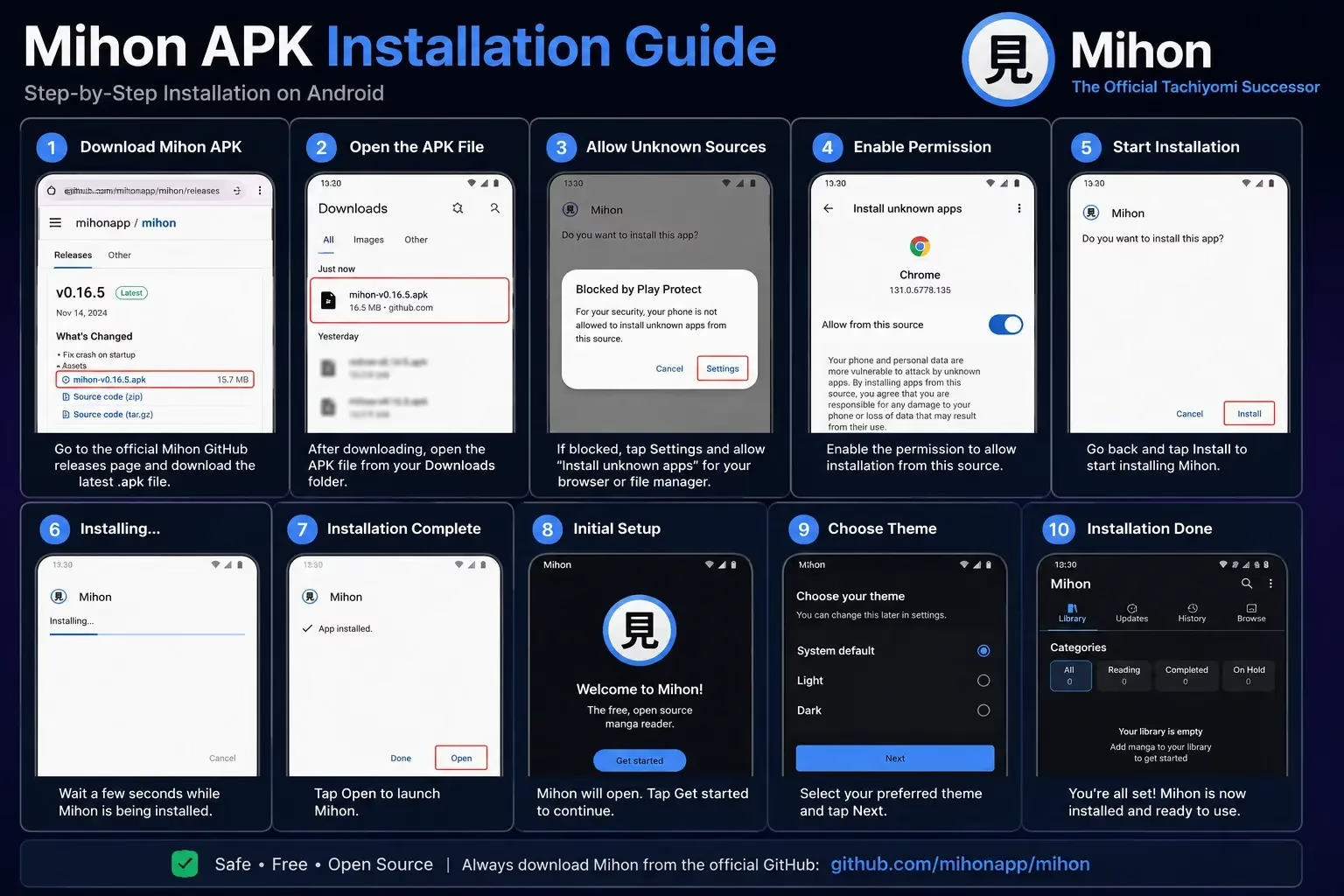
Downloading safely means using the official source only. The team distributes the APK exclusively through GitHub, the same platform where the source code is publicly auditable by anyone.
-
Go to the official GitHub releases page
Open your browser and navigate togithub.com/mihonapp/mihon/releases. This is the only trusted source for the APK file. -
Download the latest APK file
Under the latest release, find the.apkfile and tap to download it. The file will save to your Downloads folder automatically. -
Enable Install from unknown sources
Go to Android Settings, Security, Install unknown apps. Select your browser and toggle on “Allow from this source.” This is a standard Android requirement for apps outside the Play Store. -
Open the downloaded APK file
Go to your Downloads folder and tap the APK file. Android will show an installation prompt, tap Install to proceed. -
Open the app and complete initial setup
Launch it from your app drawer. When asked for a downloads folder, you can point it to your existing Tachiyomi folder if you want to keep offline chapters accessible.
How to Migrate from Tachiyomi to Mihon
Migrating your entire library takes less than five minutes. Because both apps use the identical .tachibk backup format, nothing is lost. Reading progress, categories, tracker links, and chapter history all carry over completely.
-
Create a Tachiyomi backup
Open Tachiyomi, go to More, Settings, Backup, Create Backup. Save the.tachibkfile to your Downloads folder or Google Drive. -
Install the new app
Follow the download and install steps above. Both apps can be installed simultaneously as they use different package names and will not conflict. -
Restore your backup
Open the app, go to More, Settings, Backup, Restore Backup. Select your.tachibkfile. Your entire library restores automatically. -
Add the Keiyoushi extension repository
Go to Settings, Browse, Extension Repos. Add the Keiyoushi repo URL. Then go to Browse, Extensions and reinstall your manga sources. -
Verify library and reading progress
Open your library and confirm all titles, categories, and reading positions transferred correctly. Tap the shield icon on each reinstalled extension to trust it.
Mihon Extensions How to Add Manga Sources
Extensions work identically to how they did in the original app. Each one connects to a different manga website including MangaDex, Mangakakalot, Batoto, Mangapark, Toonily, and hundreds more. Extensions are not bundled by default. You add them manually through available Mihon extension repositories maintained by the community.
1 Add the Keiyoushi Repository
The Keiyoushi repository is the primary community-maintained extension source. It contains extensions for MangaDex, Mangakakalot, Batoto, Mangapark, Toonily, and many more. To add it:
- Open the app and tap Browse in the bottom navigation bar.
- Tap the settings icon in the top right and select Extension Repos.
- Tap the plus button and paste the Keiyoushi repository URL.
- Tap Add to confirm. The repository will load available extensions.
2 Install Individual Extensions
After adding the repository, go to Browse, Extensions. Search for your preferred manga source by name and tap Install. After installation, tap the shield icon to trust each extension. For a complete list of available sources, see our Tachiyomi Extensions guide.
Mihon vs Tachiyomi Full Comparison 2026
Here is a complete side by side comparison of every key difference between the two apps:
| Feature | Mihon | Tachiyomi v0.15.3 |
|---|---|---|
| Development Status | Active | Discontinued |
| Security Updates | Regular | None |
| Android 15 Support | Yes | Not guaranteed |
| Material You Theming | Yes (Android 12+) | No |
| Navigation Style | Bottom bar (Material 3) | Hamburger sidebar |
| Extension System | Keiyoushi repo | Keiyoushi repo |
| Backup Format | .tachibk | .tachibk |
| Library Migration | Instant | N/A |
| Tracker Support | MAL, AniList, Kitsu, Shikimori, Bangumi | MAL, AniList, Kitsu, Shikimori |
| Offline Downloads | Yes | Yes |
| Cost | Free forever | Free |
| Open Source | Yes | Yes |
| Ads | None | None |
The verdict is clear. It is strictly better than the original in every dimension that matters for 2026. If you are still using Tachiyomi v0.15.3, switching involves zero risk and takes less than five minutes.
Mihon vs Other Tachiyomi Forks
It is the foundation every other fork is built on, but it is not the only option. Depending on your reading style, a different fork may serve you better:
| Fork | Navigation | OLED Theme | Source Merge | Best For |
|---|---|---|---|---|
| Mihon | Bottom bar | No | No | Most users, safest start |
| TachiyomiJ2K | Hamburger | Yes | No | Design and OLED readers |
| TachiyomiSY | Bottom bar | No | Yes | Large multi-source libraries |
| TachiyomiAZ | Original sidebar | No | No | Original Tachiyomi interface |
| Komikku | Mixed | No | Partial | Most complete feature set |
If you miss the original hamburger sidebar navigation, TachiyomiAZ restores it exactly while running the same engine underneath. For full details on all options, see our Tachiyomi forks guide.
Is It Safe? Is It Legal?
Yes. It is safe to install and use. Here is exactly why:
- Fully open-source: The entire source code is publicly available on GitHub under the Apache License 2.0. Anyone can read, audit, and verify the code. There is no hidden functionality.
- Built by the original team: Created by former Tachiyomi contributors, the same people who built and maintained the app for years.
- No content hosting: Does not host, store, or distribute any manga content. It connects to third-party websites through user-installed extensions, exactly like a browser loading a webpage.
- No account required: No registration, no personal information, and no login needed to function. Your library stays entirely on your device.
- Trusted by millions: Downloaded and reviewed by the global manga reader community since 2024 with no reported security incidents.
Legal note: The app itself is legal software. What you read through it depends on the extension sources you choose and the content rights in your region.
Frequently Asked Questions
It is the official successor to Tachiyomi, built by contributors from the original team after the app shut down in 2024. It maintains the same extension system, library format, and reading experience while adding Material You theming and active development. It is also the upstream project that every major fork including TachiyomiSY, J2K, AZ, and Komikku now branches from.
Yes, completely free, with no ads, no subscriptions, and no paid tiers. It is an open-source community project released under the Apache License 2.0. It will always be free.
Yes, completely and instantly. Both apps use the same .tachibk backup format. Create a backup in Tachiyomi via More, Settings, Backup, Create Backup, then restore it in the new app via the same path. Your entire library, reading history, categories, and tracker connections transfer with no data loss.
Yes. The same Keiyoushi community repository is used. Add the Keiyoushi repo in Settings, Browse, Extension Repos, then install your sources individually. MangaDex, Mangakakalot, Batoto, Mangapark, Toonily, and hundreds more are all available.
The original Tachiyomi v0.15.3 is frozen and receives zero updates or security patches in 2026. Mihon is actively maintained with regular updates. Functionally they are identical with the same extension system, same library format, and same reading modes. The main visible difference is a bottom navigation bar replacing the classic hamburger sidebar. If you prefer the sidebar, use TachiyomiAZ instead.
It is distributed as an APK through GitHub rather than the Play Store. This is standard for open-source manga reader apps. The Play Store policies around content extensions and third-party sources make it incompatible with how the extension system works. Downloading directly from GitHub is safe and gives you the authentic, unmodified app.
This is the best starting point for most readers, especially those migrating from Tachiyomi. If you read on an OLED screen, try TachiyomiJ2K. If you manage large libraries across multiple sources simultaneously, try TachiyomiSY for its source merging feature. If you want the original interface exactly preserved, use TachiyomiAZ. Our full Tachiyomi forks comparison covers all options in detail.
Final Verdict Should You Download Mihon in 2026?
Yes, without hesitation. If you are still using the original Tachiyomi APK v0.15.3, switching is the single most important upgrade you can make to your manga reading setup in 2026. It is free, open-source, ad-free, and built by the same people who created the original. Your entire library migrates in minutes with zero loss.
If you are new to this type of manga reader entirely, this is the safest, most reliable starting point. Start here, add the Keiyoushi extension repository, install your sources, restore your backup if you have one, and you are reading in under ten minutes.